

How can I exclude sale items from earning points?
Where this is configured
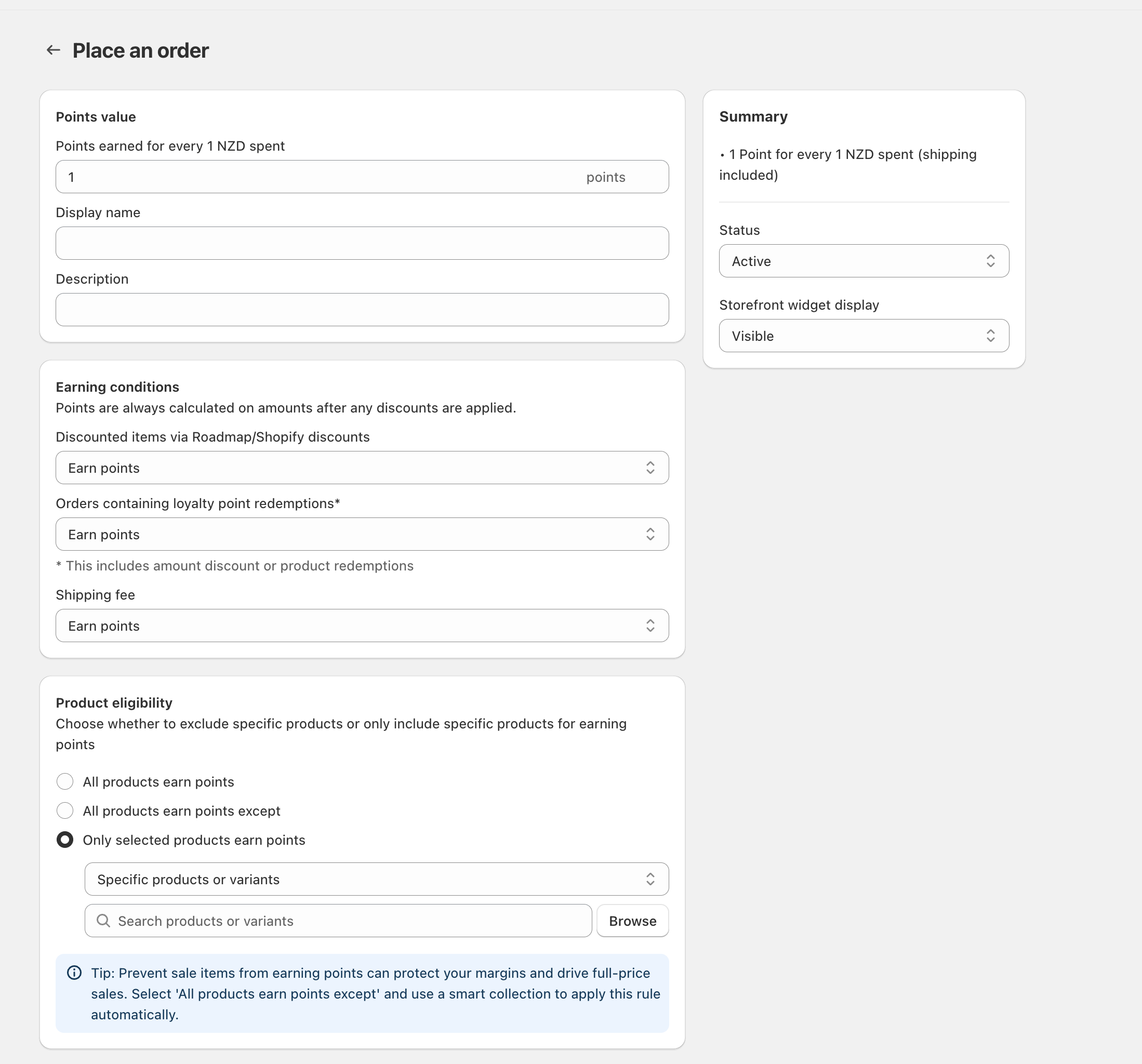
Sale-item exclusions are controlled inside your “Place an order” points-earning rule. This is where you set:
- How many points customers earn (Points value)
- Whether discounted items should earn points (Earning conditions)
- Which products are eligible to earn points (Product eligibility)
Option 1: Exclude discounted items (automatic)
If your “sale items” are created using Shopify discounts (or Roadmap discounts), you can stop points from being earned on discounted line items.
Go to the Place an order rule where you see Points value, Earning conditions, and Product eligibility.
In Earning conditions, find Discounted items via Roadmap/Shopify discounts and change it from Earn points to the option that prevents earning on discounted items (for example, Don’t earn points).
Save your changes, then run a quick test order with a discounted item to confirm no points are awarded for that line item.
Points are calculated after discounts. The rule notes: “Points are always calculated on amounts after any discounts are applied.” This means even if you still allow discounted items to earn points, the points will be based on the discounted price (not the original price).
Option 2: Exclude “sale items” by product list (recommended for sale collections)
If your sale items are managed as a group (for example, a “Sale” smart collection), exclude those products using Product eligibility.
In Product eligibility, select All products earn points except.
Use the selector to choose the set you want to exclude (for example, a smart collection of sale items). If you’re excluding individual items instead, choose Specific products or variants.
Use Search products or variants (or click Browse) to add the products/variants you want to exclude from earning points.
If you frequently rotate sale items, exclude them using All products earn points except and a smart collection. That way, anything that enters/leaves the Sale collection is automatically excluded/included without manual updates.
Common related settings (optional)
In Earning conditions, use Shipping fee to control whether points apply to shipping charges. Set it to the option that matches your policy.
Use Orders containing loyalty point redemptions* to decide whether customers still earn points on orders where they redeemed points (including amount discounts or product redemptions).
If you exclude products via Product eligibility, those items won’t earn points even at full price. If you only want to block points when an item is discounted, use Discounted items via Roadmap/Shopify discounts instead (Option 1).