

Can I limit earning to certain products, collections, or customer groups?
Yes—by products (and collections). Not directly by customer groups.
In Roadmap Loyalty, points earning eligibility is controlled in your “Place an order” points-earning rule using the Product eligibility section.
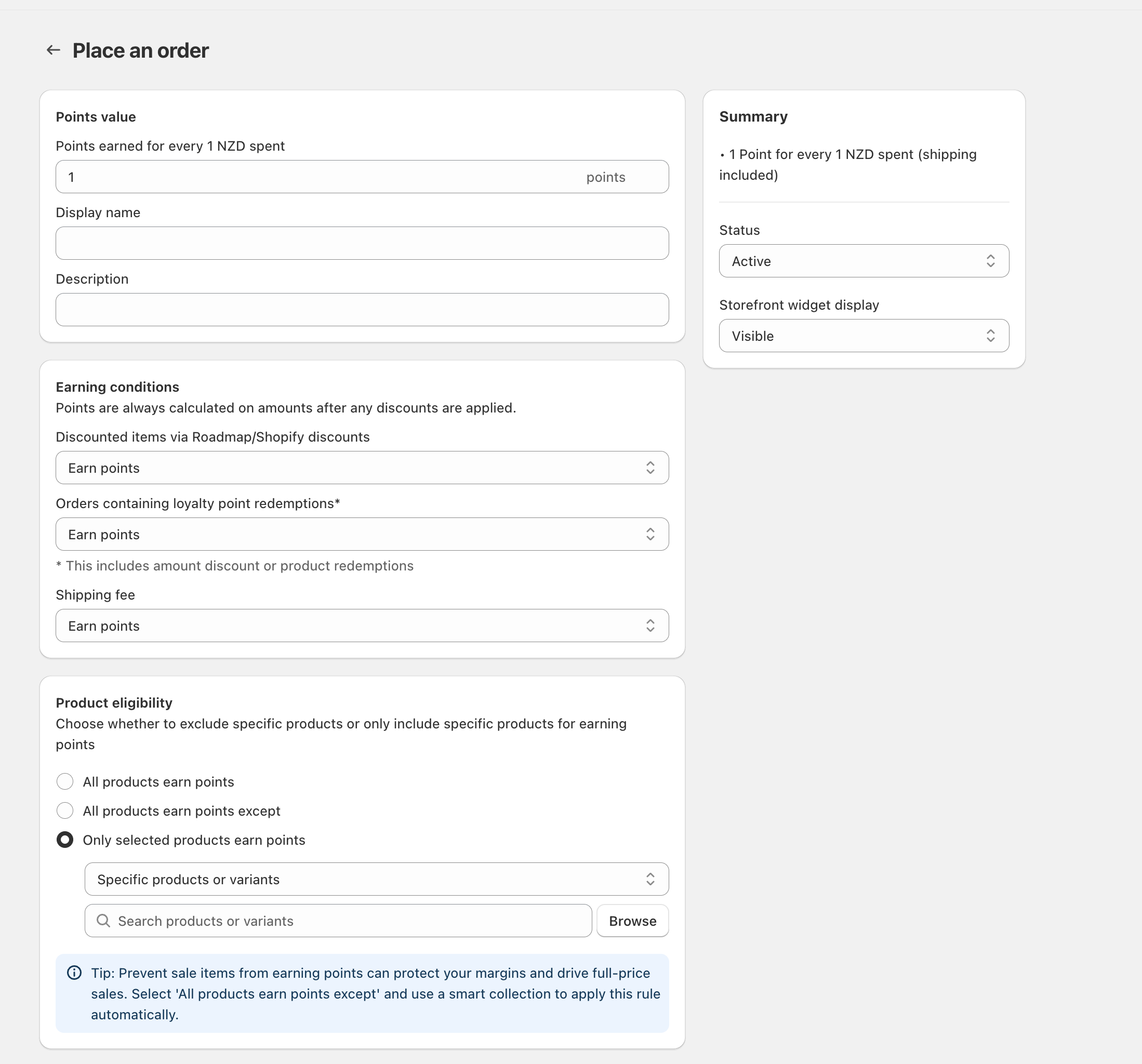
Limit earning to certain products or variants
Go to your loyalty setup and open the Place an order rule (the screen that includes Points value, Earning conditions, and Product eligibility).
Under Product eligibility, select Only selected products earn points.
Use the selector (for example Specific products or variants), then add items using Search products or variants or Browse.
Save your changes, then place a test order with an included item and an excluded item to confirm only the included line earns points.
Exclude certain products or collections from earning
If you want most items to earn points, but you need to block a set of products (for example, low-margin items or sale items), use the exclusion option.
Under Product eligibility, select All products earn points except.
Add the products/variants you want to exclude using Search products or variants or Browse.
If your “excluded” items change often (for example a rotating Sale range), use a Shopify smart collection for that set and keep your exclusions aligned to that collection—so the rule updates automatically as products move in/out of the collection.
The easiest way to exclude sale items at scale is to use All products earn points except with a smart collection that automatically captures discounted products.
What about limiting earning by customer group (VIPs, wholesale, members)?
Roadmap’s points-earning control for orders is product-based via Product eligibility. There isn’t a matching Customer Eligibility section on the Place an order earning rule.
You can target customer groups for discounts and GWPs using the Customer Eligibility section in Discounts / Gift with Purchase (for example: Customers tagged with, Customers NOT tagged with, or Members with tiers selected in Enter membership tiers…). That targeting applies to the discount/GWP—separately from points earning.
Related settings that affect earning
In Earning conditions, use Discounted items via Roadmap/Shopify discounts to decide whether discounted line items can still earn points.
In Earning conditions, use Orders containing loyalty point redemptions* to control whether customers earn points on orders where they redeemed points (including amount discounts or product redemptions).
In Earning conditions, use Shipping fee to control whether points apply to shipping charges.
If you use Only selected products earn points, anything not explicitly added will earn 0 points—even if it’s full-price. If you only want to block points in certain cases (like discounted items), use the relevant setting in Earning conditions instead.