

What types of rewards can I offer (points, products, discounts, tiers, referrals)?
Where rewards live in Roadmap
Roadmap organizes loyalty rewards inside the Loyalty Program area. From here you can manage:
Points (earn rules + redemption rewards)
Membership Tiers (VIP tiers + tier-based benefits)
Referral Program (advocate + friend incentives)
If you don’t see a reward type in your store, start from Loyalty Program and check whether it’s configured under Points, Membership Tiers, or Referral Program.
1) Points (the foundation)
Points are the core currency of your program. You configure them in Loyalty Program → Place an order.
Ways customers can earn points
On the Loyalty Points screen, the Ways to earn list controls which actions award points (and how many).
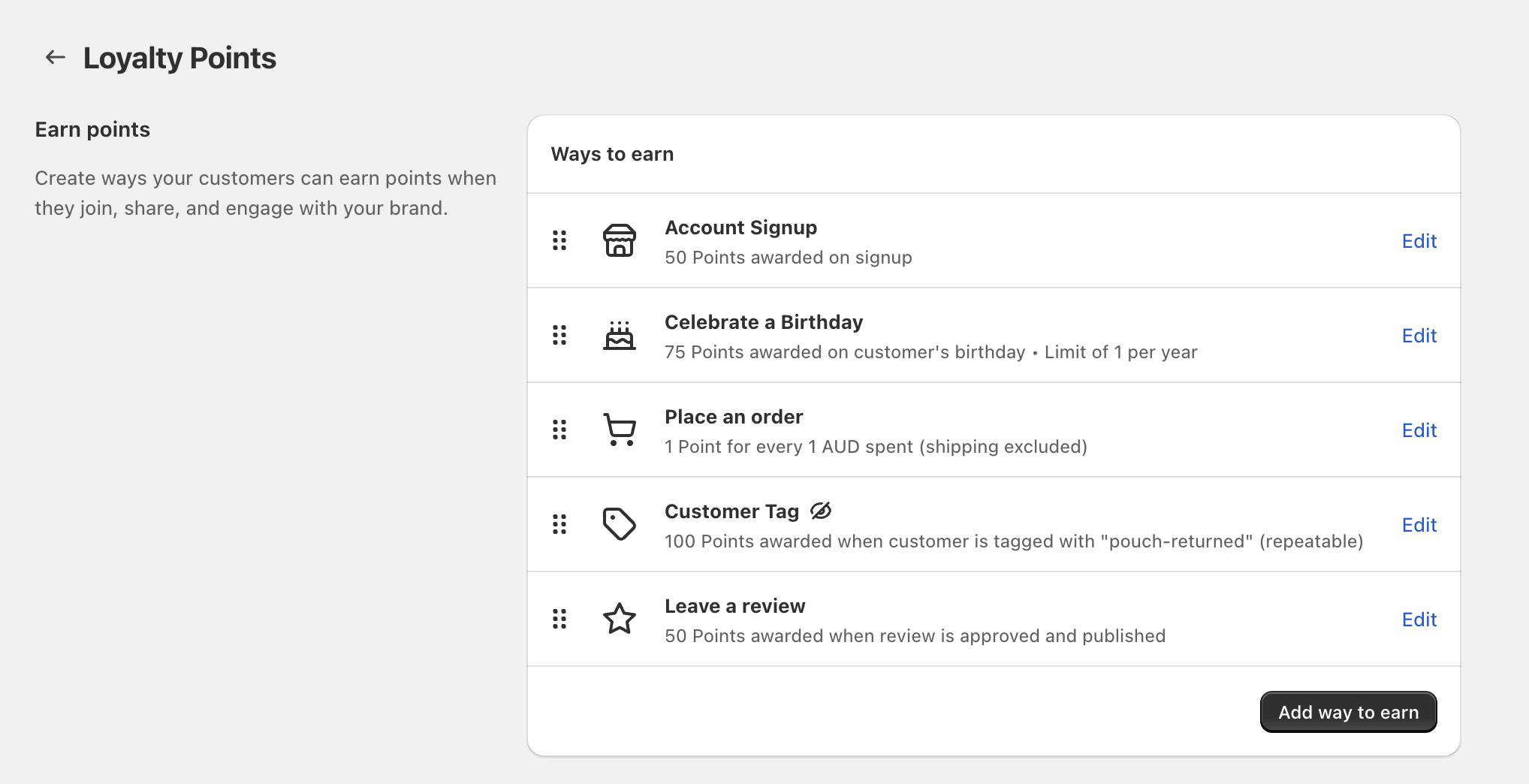
Go to Loyalty Program → Points and find Ways to earn.
Select Add way to earn.
Pick the action you want to reward (for example Place an order, Account Signup, Celebrate a Birthday, Leave a review, or Customer Tag).
Use Edit next to an earning rule to change the points amount and any limits (for example a yearly limit on birthday points).
Keep your initial Ways to earn list short (2–5 actions). It’s easier for customers to understand, and easier for you to evaluate what’s working.
Ways customers can redeem points
Point redemption rewards are configured in Redeem points → Ways to redeem. These are the rewards customers can claim using the points they’ve earned.
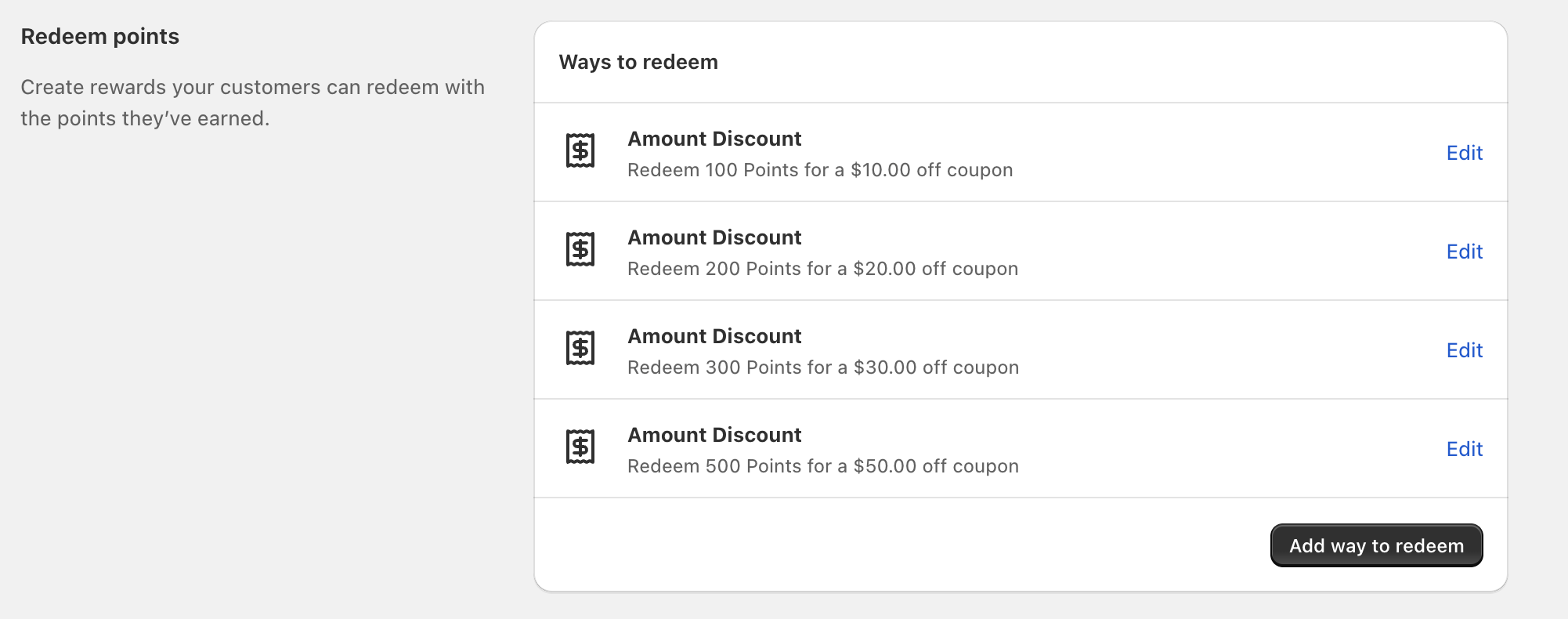
Go to Loyalty Program → Points and scroll to Redeem points.
Select Add way to redeem.
Create redemption options (for example, an Amount Discount that lets customers redeem a set number of points for a set $ amount off).
Use Edit next to a redemption reward to adjust point cost, discount amount, and any restrictions.
2) Discounts (coupons customers redeem)
In Roadmap Loyalty, discounts are typically offered as point redemption rewards—most commonly an Amount Discount in Ways to redeem (for example, “Redeem 200 Points for a $20.00 off coupon”).
If you want customers to “buy” discounts with points, configure them under Redeem points → Ways to redeem rather than under tiers.
3) Products (tier benefits and product-specific perks)
Product rewards are commonly delivered as tier benefits—especially when you want VIP members to receive a product-specific offer when they reach (or maintain) a tier.
Tier rewards (product-based perks)
In Membership Tiers, you can create Customer Rewards that trigger when a customer reaches a tier (or after they maintain a tier for a period of time). These rewards can be configured with product-focused restrictions (for example “100% off on 1 cart product”).
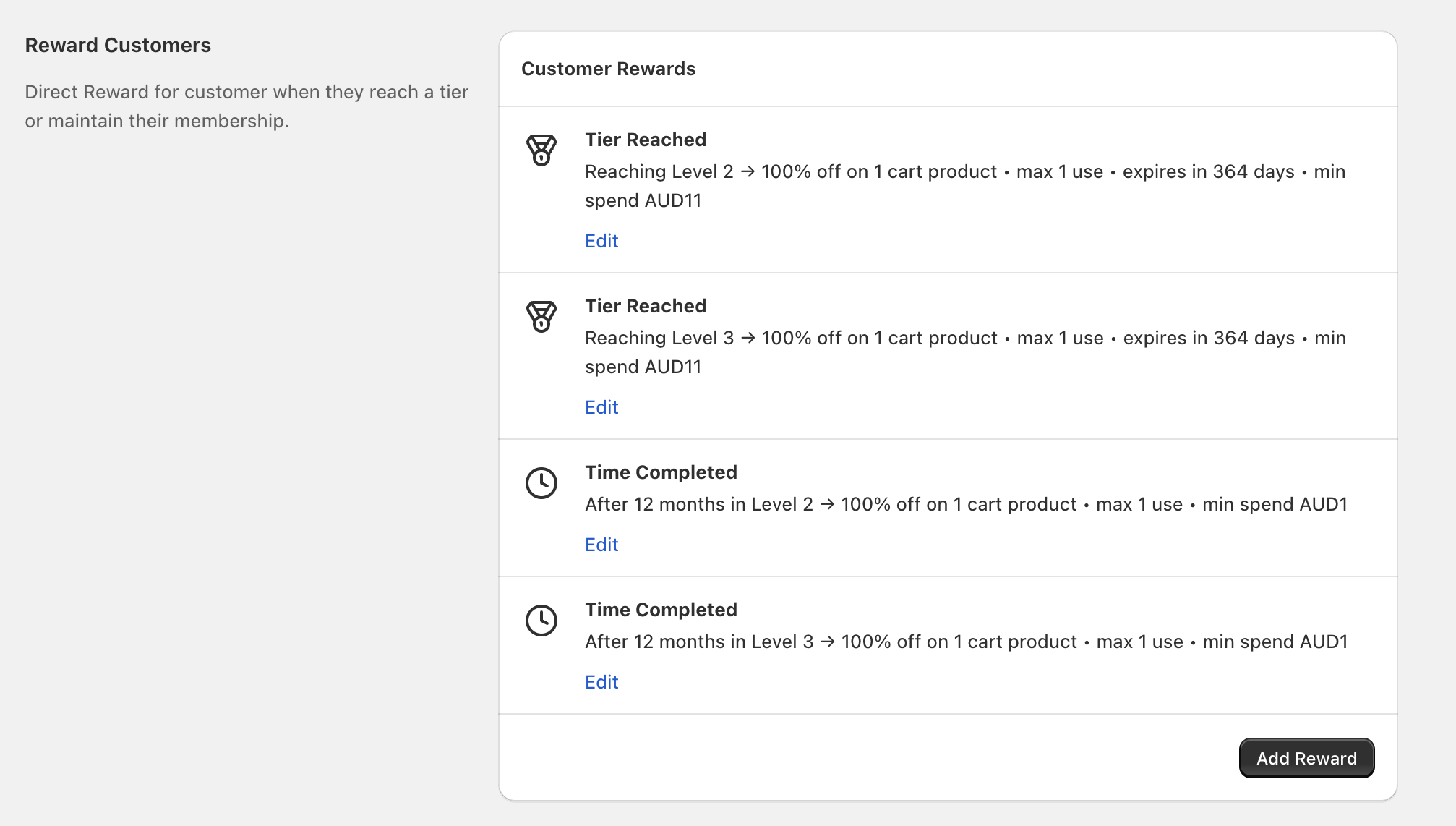
Go to Loyalty Program → Membership Tiers.
In Reward Customers / Customer Rewards, select Add Reward.
Pick when it should trigger, such as Tier Reached or Time Completed (for example, “After 12 months in Level 2”).
Set the reward details (for example a product-specific discount like “100% off on 1 cart product”), plus any limits, expiry, or minimum spend.
Tier rewards can include limits and expiry. Double-check these settings before you announce your VIP benefits publicly so customers aren’t surprised at checkout.
4) Tiers (VIP levels and benefits)
Tiers are managed under Loyalty Program → Membership Tiers. Use tiers when you want to automatically unlock better benefits for your best customers (instead of relying only on point redemptions).
Tier structure: Create multiple levels (for example, Level 1, Level 2, Level 3) and define how customers qualify.
Tier benefits: Use Customer Rewards like Tier Reached and Time Completed to deliver perks at the right moment.
5) Referrals (incentives for advocates and friends)
Referrals are configured in Loyalty Program → Referral Program. This is where you set up the referral flow and incentives for:
The friend (the new customer who uses the referral)
The customer (the existing customer who shared it)
Referrals work best when the reward is simple and the trigger is clear. After you set up referrals, review your storefront presentation in Edit Loyalty Widgets so customers can easily find and share their referral offer.
Choosing the right reward mix
Start with Points: create a few Ways to earn and 2–4 Ways to redeem (often an Amount Discount at multiple point levels). Add Membership Tiers after you’ve validated your point economy.
Add Membership Tiers and use Customer Rewards like Tier Reached perks (for example, a product-specific reward) to make VIP status feel immediately valuable.
Use Referral Program and make sure the referral experience is visible in your storefront loyalty widgets via Edit Loyalty Widgets.