

Configuring Loyalty membership participation criteria
Choosing your membership participation criteria
In Roadmap Loyalty, membership eligibility controls which customers are considered “participants” in your loyalty program—meaning who can earn points, progress through tiers, and redeem rewards.
You configure this in Membership Settings under Member Participant Criteria. There are two options:
All customers
Only customers who have a store account
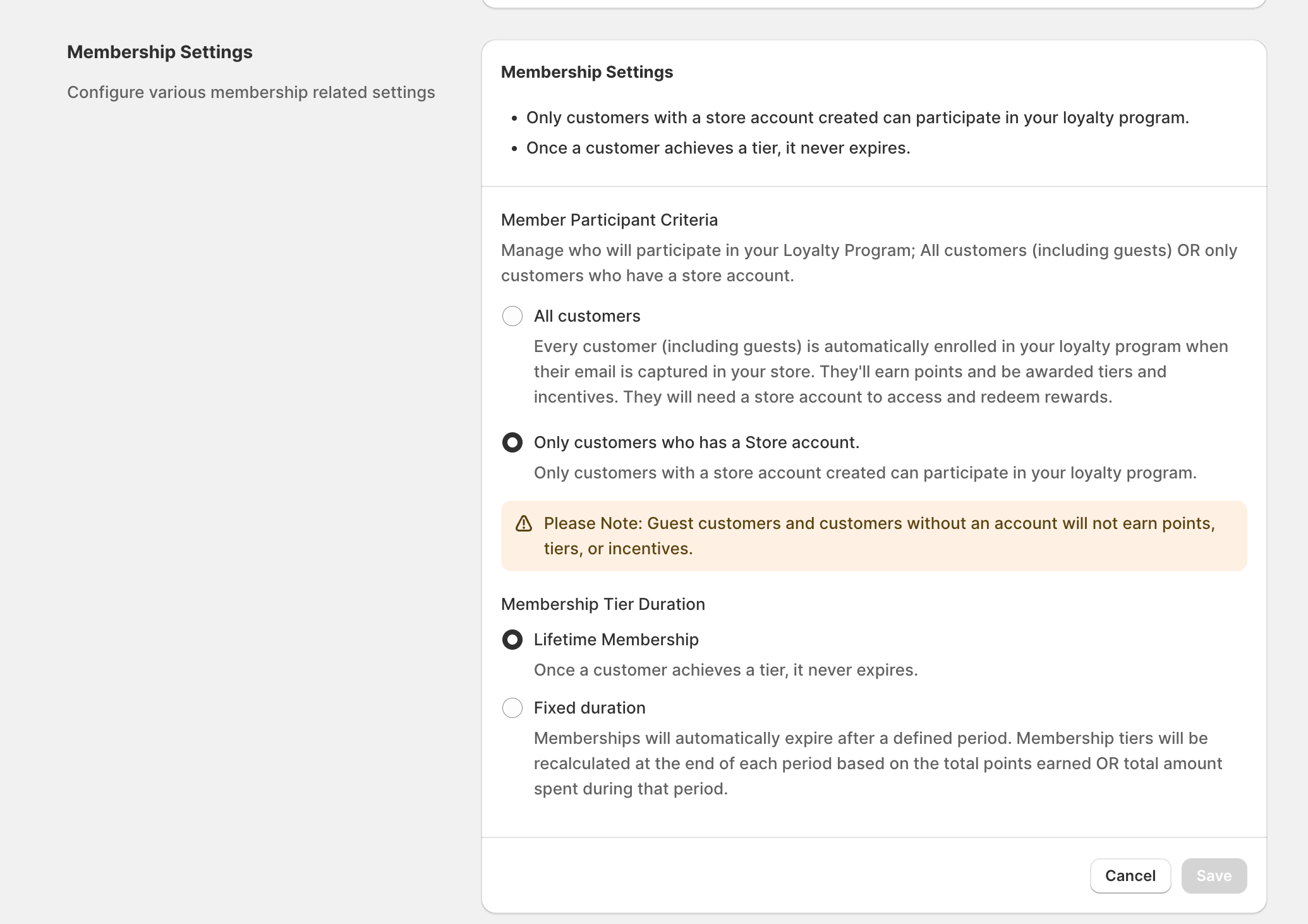
Where to change this setting
In the Roadmap admin, go to Membership Settings.
Under Member Participant Criteria, select All customers or Only customers who have a store account.
Click Save (or Cancel to discard changes).
Once your Loyalty program is set to Active, this setting can’t be changed unless you deactivate your program first.
Changing eligibility affects who can earn and redeem moving forward. For example, if you switch to Only customers who have a store account, guest customers (and any customer without a store account) will stop earning points and won’t be able to redeem until they have a store account.
Option 1: All customers
When All customers is selected:
Any customer becomes a loyalty member once their email is captured (online or in POS).
They can earn points and be awarded tiers and incentives.
They can redeem rewards in POS with a store account. However, to redeem online, they will need to log in to a store account to access their rewards attributed to the email address.
Who may be limited?
Customers without a store account can still earn, but may not be able to fully redeem online until they create an account and log in.
Customers without an email address (for example, created in POS without an email) can’t enter the loyalty program until an email is added to their customer profile.
Customer journey (All customers)
This is the typical flow when you allow all customers into the program:
Email captured (online or in POS) → customer is enrolled as a loyalty member.
Customer begins to earn loyalty points.
Roadmap records membership details (for example, member since, start date, and tier status).
Customer can redeem in POS; for online redemption they may need to log in.
Option 2: Only customers who have a store account
When Only customers who have a store account is selected:
Only customers who meet Roadmap’s definition of “has a store account” can participate.
Customers who do not have a store account won’t earn points, tiers, or incentives until they do.
This setting is best if you want loyalty to be tied to logged-in customer accounts (for example, to support a consistent online redemption experience).
What “has a store account” means (membership triggers)
When eligibility is set to Only customers who have a store account, Roadmap uses specific customer actions as “triggers” that qualify a customer as a member.
Legacy Account Stores: Triggers that make a customer eligible (or not)
Customer action | Counts as a member today? | Notes / how it’s detected |
|---|---|---|
Customer logs in online (email + password) | Yes | Detected when the customer account is enabled in Shopify (Roadmap receives the enabled status). |
POS order placed with a customer profile with email address | Yes | POS order linked to a customer will qualify them as a member for loyalty participation (as long as the customer profile has an email address). |
Admin creates a customer profile (no purchase) | No | Creating a customer record alone doesn’t qualify them for loyalty when “store account” eligibility is required. |
POS customer created without an order | No | A customer profile created in POS (without an order) does not qualify as having a store account. |
Guest checkout online | No | Guest checkout does not create/confirm a store account. |
Shop Pay checkout | No | Shop Pay checkout alone does not qualify as having a store account for this setting. |
Newsletter signup | No | Marketing opt-in does not qualify as a store account. |
Third-party app creates a customer | No | Customer creation via an app does not qualify as a store account by itself. |
When “Only customers who have a store account” is enabled, customers must also have an email address on their customer profile to participate. If a POS customer has no email, they won’t be eligible until an email is added.
Customer journey (Only customers who have a store account)
This is the typical flow when participation requires a store account:
Customer creates an account and/or logs in online → customer becomes eligible.
Roadmap starts tracking them as a loyalty member (member since/start date/tier status).
From this date, customer earns points on eligible purchases and can redeem based on your rewards setup
Customers will not earn points prior to entering the loyalty program and will not be rewarded for past action that would result in earning points. To reward past actions, you will need to manually add these point into the customers loyalty account.
Quick decision guide
Choose “All customers” if you want loyalty to start as soon as you capture an email (including guest checkouts and POS emails).
Choose “Only customers who have a store account” if you want loyalty participation limited to customers who have a verified store account/login experience.
If you sell both online and in-store and want POS shoppers to fully participate, make sure staff capture the customer’s email at checkout—especially when “Only customers who have a store account” is enabled.