

How bundles work
Overview
Roadmap Bundles lets you sell multiple separate products together as a single bundle on your storefront—without needing to create a new “bundle product” that changes your SKU and fulfilment workflow.
What makes Roadmap Bundles different
- Build bundles from separate products or variants: You’re not forced into variant-only bundles or workarounds that limit merchandising.
- Bundle in the cart, SKUs in fulfilment: Shoppers experience a bundle, while your operations team fulfils the real items.
- Better customer experience: Bundle items are clearly grouped together so it’s obvious what’s included.
How bundles look to customers (cart and checkout)
When a bundle is added to the cart, the products that make up the bundle appear grouped together. This keeps the bundle easy to understand and reduces confusion at checkout.
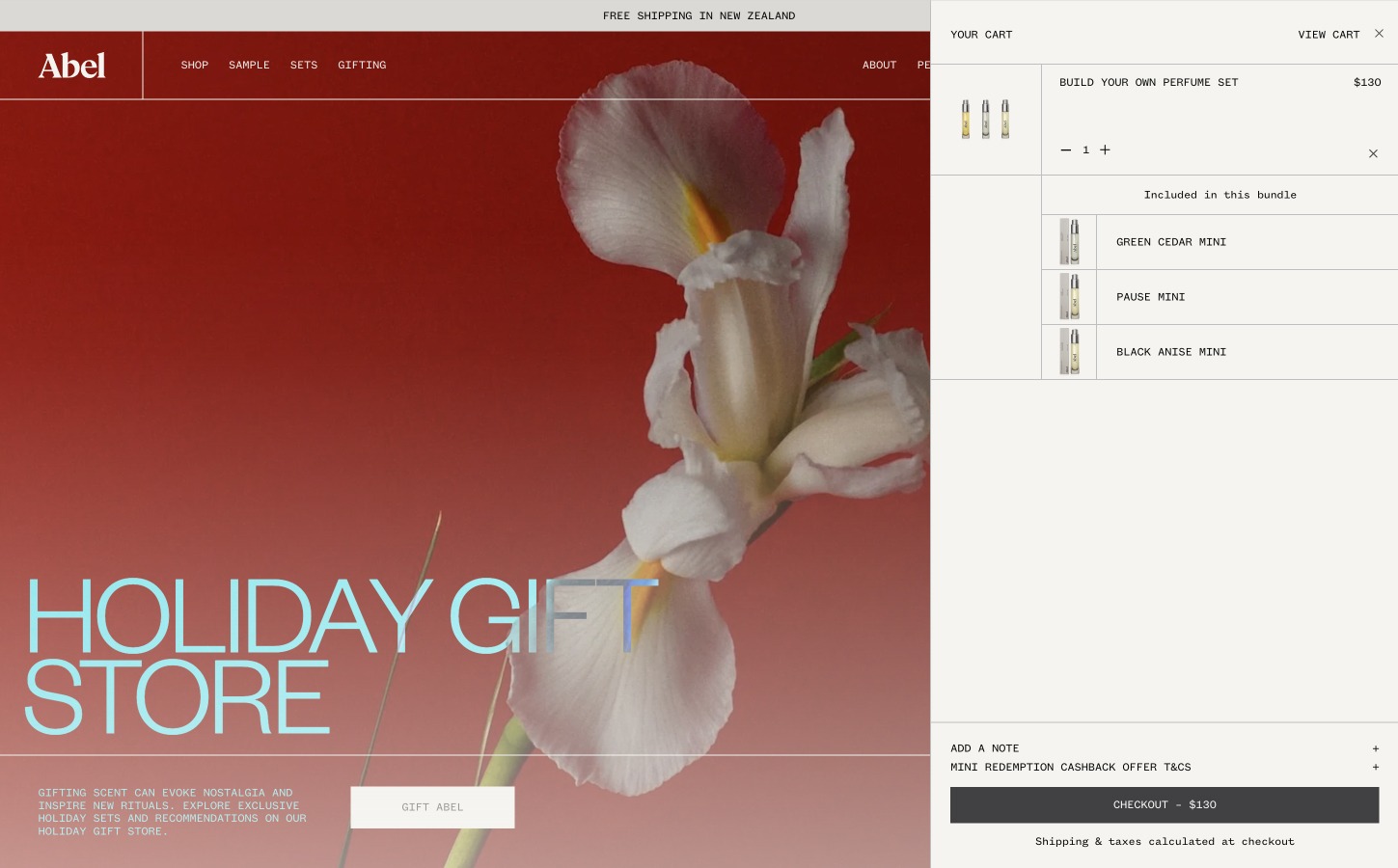
Bundle items are locked together
To protect the bundle offer and keep fulfilment accurate, customers can’t edit the bundle contents from the cart:
- Customers can’t add extra items into the bundle group.
- Customers can’t remove a single product from the bundle group (they remove the bundle instead).
How bundles work in Shopify orders (fulfilment)
When a customer purchases a bundle, Shopify creates the order with the individual component products (each with its own SKU). This means your existing fulfilment, ERP, and 3PL integrations can keep working exactly as they do today.
What your team will see on each line item
- The product title and SKU (as normal for fulfilment and inventory).
- A bundle reference such as Part of: [Bundle name] so it’s clear the item was purchased via a bundle.
Why this gives you merchandising power without operational compromise
- Merchandising stays flexible: You can bundle across products and variants without being boxed into variant restrictions.
- Fulfilment stays efficient: Warehouse teams pick the real SKUs—no special training or mapping needed.
- Inventory remains standard: Stock is deducted for the component items, not an artificial bundle product.
Track bundle performance in Roadmap
Roadmap tracks bundle performance in the Analytics tab. Use the All campaigns dropdown and the date picker (for example, Last 7 days) to filter results. In Bundles ranked by sales volume, click Export Report to download reporting for the current view.
No. Roadmap bundles bring separate SKU products together for selling, but fulfilment is based on the component SKUs that already exist in your catalog.
No. Bundle items appear grouped together and can’t be added to or removed from individually. This keeps the bundle consistent and prevents fulfilment issues.
In Shopify, go to Orders and search for the bundle name. Bundle orders include a reference such as Part of: [Bundle name] on the component line items.
Usually not. Because the order contains normal Shopify line items with real SKUs, most ERP and 3PL integrations can continue operating as-is.