

Fulfilment and ERP integration
Roadmap Bundles lets you sell multiple separate SKU products together as a single bundle on your storefront. When a customer purchases a bundle, the order is created in Shopify with the individual component products (each with its own SKU), so your existing fulfilment, ERP, and 3PL integrations can keep working exactly as they do today.
How bundle purchases appear in Shopify orders
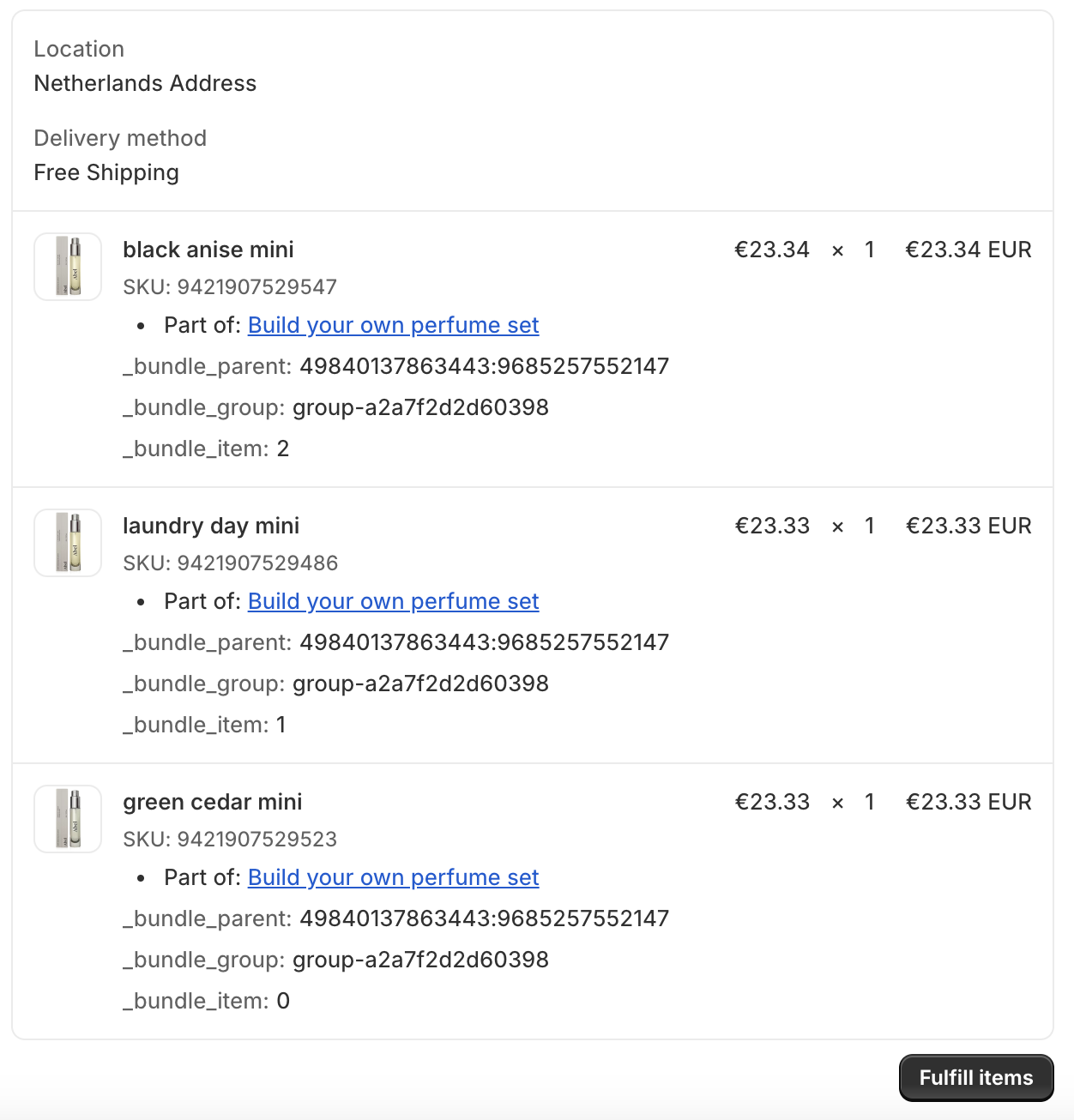
In the Shopify admin, a bundle purchase appears as multiple line items (the products that make up the bundle). Each line item includes a reference to the bundle name so your team can still see which bundle the customer bought.
What you’ll see on each line item
- The product title and SKU (as normal for fulfilment and inventory).
- A bundle reference such as Part of: [Bundle name] so it’s clear the item was purchased via a bundle.
Why this requires zero ERP/fulfilment work
Because Roadmap bundles resolve to standard Shopify order line items, most ERP and fulfilment solutions can consume the order without any special mapping or bundle logic.
- Pick/pack lists stay accurate: warehouse teams see the real products that need to ship.
- SKU-based integrations keep working: ERPs and 3PLs typically rely on SKUs for fulfilment and inventory updates.
- Inventory remains standard: stock is deducted for the component items, not an artificial bundle product.
How to find bundle orders quickly
You have a few reliable ways to find bundle orders in Shopify:
bundles), confirm that your Shopify admin is applying that tag in your workflow. Tags are store-specific and may be added by automation tools or internal processes rather than Shopify by default.What customers see in confirmations
When a bundle is purchased, customers typically see the bundle context in their confirmation experience while the order still contains the underlying products. This keeps the customer-facing experience consistent (they bought a bundle) while keeping fulfilment accurate (you ship SKUs).
No. Roadmap bundles bring separate SKU products together for selling, but fulfilment is based on the component SKUs that already exist in your catalog.
Most integrations receive the order’s line items (products/SKUs). The bundle name is shown in Shopify as a reference on the items (for example, Part of: [Bundle name]). If your ERP supports line item properties/notes, it may also ingest that context.
Yes. In Roadmap, open the Analytics tab to view bundle performance and use Export Report in the Bundles ranked by sales volume section for reporting.