

How do I combine GWPs with loyalty rewards or bundles?
Overview
You can run a Gift with Purchase (GWP) at the same time as:
Loyalty rewards (points redemptions like Amount Discount coupons, or tier-based Customer Rewards)
Bundle-style offers you create in Roadmap Discounts (for example, product offers built with Buy X Get Y or Buy A+B+C Get Y)
The key is to prevent unintended stacking by using Roadmap’s Customer Eligibility controls and making sure your offer Conditions don’t overlap.
Roadmap GWPs automatically add the free gift to the cart once the discount conditions are met. You configure this in Discounts / Gift with Purchase on the New Gift with Purchase screen.
Option 1: Combine a GWP with loyalty tiers (VIP-only GWPs)
If you want a GWP to be available only to VIPs (or only to a specific tier), use Customer Eligibility on the GWP.
Level 2).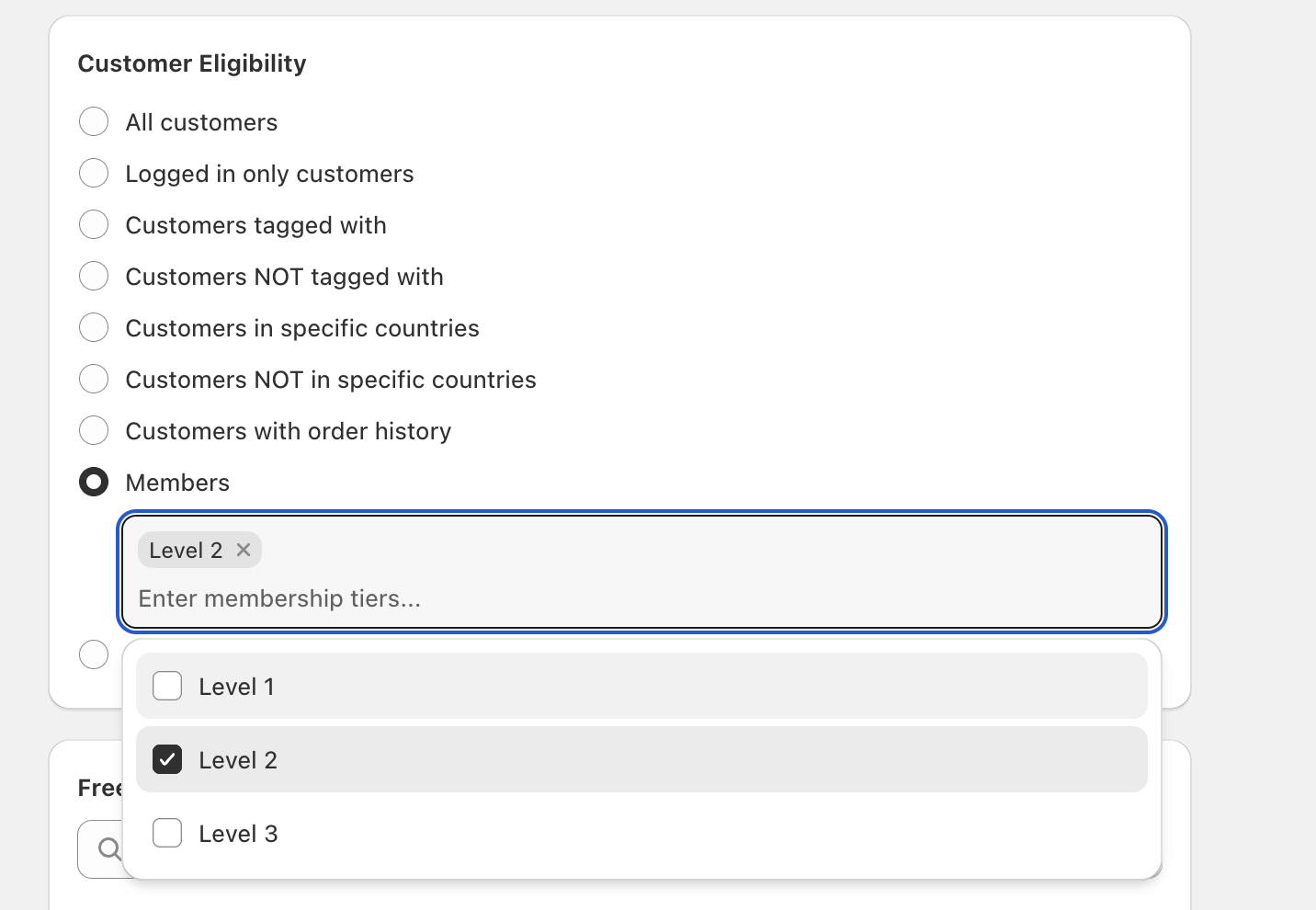
If you don’t want to manage tier selection inside the GWP, you can also target loyalty tiers using tags: set a Customer Tag Name on each tier (in Membership Tiers → Edit), then set the GWP’s Customer Eligibility to Customers tagged with.
Option 2: Combine a GWP with points redemptions (coupon rewards)
Points redemptions typically create coupons (for example, an Amount Discount under Redeem points → Ways to redeem). Customers may redeem those rewards while also qualifying for a GWP—as long as your GWP isn’t restricted in a way that excludes them.
Recommended setup for “GWP + points coupon”
Keep the GWP qualification clear: use a simple Minimum Spend threshold in Conditions, or tightly defined products in Buy X Get Y.
Use Customer Eligibility to control who can stack: for example, make the GWP Logged in only customers if your loyalty program requires customers to have an account.
Limit gift quantity: set Maximum number of uses per order (many stores set this to 1) to prevent multiple gifts on large carts.
Roadmap’s own guidance notes that Shopify generally applies the best discount for the customer when multiple discounts could apply. If a points coupon and another discount conflict, the customer may end up getting the one that yields the biggest savings.
Option 3: Combine a GWP with bundle-style discounts
If by “bundles” you mean “buy these items together and get an offer,” you can model that with Roadmap Discounts using:
Gift with Purchase → Conditions like Buy X Get Y or Buy A+B+C Get Y (when the “bundle” should result in a free gift), and/or
Product Discount (created from Select discount method) for the bundle discount itself, alongside a separate GWP.
How to avoid overlap when running both
Split eligibility: For example, make the bundle discount apply to All customers, and make the GWP apply only to Members (or only to certain tiers).
Split conditions: If both promotions are product-based, ensure they don’t trigger on the exact same cart contents. Use different qualifying products/variants, or add a Minimum Spend threshold to only one of them.
Check timing: Use Active Dates (Start date/Start time, optional Set end date) so promotions don’t overlap unintentionally.
Running several active discounts that target the same customers and products can lead to unexpected checkout results. Before going live, review each offer’s Conditions, Customer Eligibility, Active Dates, and Maximum number of uses per order.
Quick checklist before you launch
In Discounts / Gift with Purchase, use the tabs (All, Active, Scheduled, Expired, Draft) to confirm what’s currently running.
On each GWP, confirm Customer Eligibility is intentional (for example, Members with the right tiers selected, or Non-members to keep VIP perks exclusive).
In Free Gifts, verify the gift variant (via Search variants or Browse) and set a sensible Maximum number of uses per order.
If customers should understand why a gift is in-cart, add clear text in Free Gifts → Note (this shows to customers on the cart page).
VIP-only GWP: GWP Customer Eligibility = Members, tier =
Level 2and above.Everyone gets the gift, VIPs get extra savings: GWP Customer Eligibility = All customers; VIP discount delivered via Membership Tiers → Customer Rewards.
Bundle discount + VIP gift: Bundle discount applies broadly; GWP restricted to Members to avoid over-discounting.
Check Free Gifts → Maximum number of uses per order. If it’s set to No limit, customers may receive multiple gifts in a single checkout if they qualify multiple times.