> For the complete documentation index, see [llms.txt](https://docs.roadmap.so/llms.txt). Markdown versions of documentation pages are available by appending `.md` to page URLs; this page is available as [Markdown](https://docs.roadmap.so/subscriptions/managing-subscriptions/churn-prevention-cancellation-and-pause-flows.md).
# Churn prevention: cancellation and pause flows
Intercept subscription cancellations and pauses with a guided flow that captures why customers are leaving and offers a pause instead — so you keep more subscribers.
Churn Prevention turns a one-click cancellation into a short, guided flow.
Instead of a plain "are you sure?" confirmation, a customer who tries to cancel is asked why they're leaving and then offered the chance to pause instead. You keep more subscribers, and you learn why the rest are going.
#### What this setting does
There are two independent flows:
* **Cancellation flow** — runs when a customer clicks **Cancel subscription**. It captures a reason, optionally offers a pause, then confirms.
* **Pause flow** — runs when a customer clicks **Pause subscription** directly. It shows a short retention prompt, then asks how long to pause for.
#### Before you start
* Both flows are off by default.
* While a flow is off, the customer sees the same simple confirmation dialog as before.
* If you plan to offer a pause during cancelling, set up the **Pause flow** first.
#### Where to find it
In Roadmap, open **Subscriptions** → **Churn Prevention**.
The Churn Prevention page has four tabs:
* **Overview** — performance metrics and a map of each active flow.
* **Cancellation flow** — the reason survey, pause offer, and tagging settings.
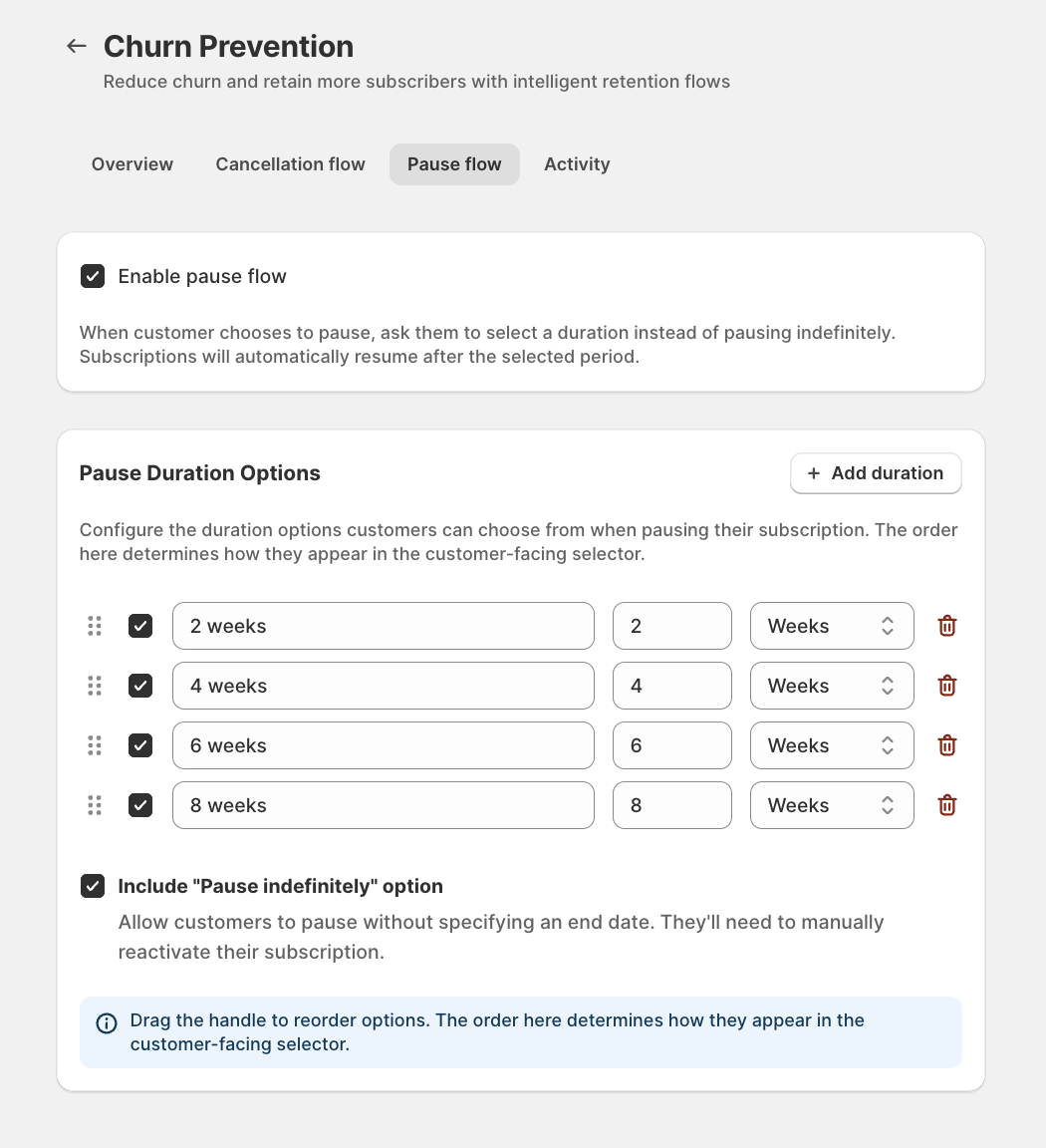
* **Pause flow** — pause duration options and the **Pause indefinitely** choice.
* **Activity** — a log of every cancel, pause, and resume event.
#### Read your churn at a glance
The **Overview** tab summarizes the last 30 days. It shows total Cancellations, total Pauses, your Save rate, the Top cancellation reason, and Average pause duration.
Below the metrics, each flow is shown as a step-by-step diagram with an Active or Inactive status. You can confirm at a glance what your customers are currently being shown.
{% hint style="info" %}
Save rate answers one question: of the customers who started cancelling, how many chose to pause instead? A customer who clicks **Pause subscription** directly was never trying to cancel, so they don't count toward your save rate.
{% endhint %}
#### Set up the cancellation flow
Open the **Cancellation flow** tab. The **How it works** panel summarizes the customer experience. The settings below control it.
{% stepper %}
{% step %}
**Enable the cancellation flow**
Turn on **Enable cancellation flow** to show the reason survey and pause offer when a customer tries to cancel.
{% endstep %}
{% step %}
**Decide whether to offer a pause**
Turn on **Offer pause instead of cancel** to add a pause step after the reason survey.
The pause uses the duration options you set on the **Pause flow** tab.
{% hint style="info" %}
The duration options offered here come from the **Pause flow** tab. If that flow isn't set up, customers won't see duration choices.
{% endhint %}
{% endstep %}
{% step %}
**Set the tag prefix**
When a customer cancels with a reason, Roadmap tags their Shopify customer record so you can segment churned customers.
The **Tag prefix** is the start of that tag — `cancelled:` by default — and produces tags like `cancelled:too-expensive`.
{% endstep %}
{% endstepper %}
#### Customise the cancellation reasons
The **Cancellation Reasons** card controls the dropdown a customer picks from.
Each reason has a display label, which is what the customer reads, and a slug, which is what is used in the tag.
* Click **Add reason** to add a new option.
* Drag the handle to reorder reasons. Customers see the same order.
* Include an **Other** reason so customers can enter free text.
{% hint style="info" %}
Roadmap ships with a set of default reasons. If you clear the list entirely, the defaults are used so customers always have something to choose from.
{% endhint %}
#### Set up the pause flow
Open the **Pause flow** tab. These settings control what happens when a customer pauses, both from the direct **Pause subscription** button and from the pause offer in the cancellation flow.
{% stepper %}
{% step %}
**Enable the pause flow**
Turn on **Enable pause flow** to ask customers to choose a pause duration instead of pausing indefinitely.
Subscriptions automatically resume after the selected period.
{% endstep %}
{% step %}
**Configure the duration options**
Under **Pause Duration Options**, add the lengths customers can choose from.
The defaults are `2`, `4`, `6`, and `8` weeks. For each option you set a label, a number, and a time unit.
* Click **Add duration** to add an option.
* Use the checkbox to enable or disable an option without deleting it.
* Drag the handle to reorder options. Customers see the same order.
{% endstep %}
{% step %}
**Decide whether to allow an indefinite pause**
Turn on **Include "Pause indefinitely" option** to let customers pause with no end date.
An indefinitely paused subscription won't resume on its own. The customer has to reactivate it.
{% endstep %}
{% endstepper %}
#### What the customer sees
**Cancelling**
When the cancellation flow is on, clicking **Cancel subscription** opens a multi-step dialog instead of a simple confirmation.
First, the customer picks a reason. **Continue** stays disabled until they choose one. Selecting **Other** reveals a free-text box.
If you've enabled the pause offer, they're then asked whether they'd like to pause instead of canceling.
If they choose to pause and you've configured duration options, they pick how long. The dialog shows the exact date the subscription will resume.
If they decline the pause, a final confirmation completes the cancellation.
**Pausing directly**
When the pause flow is on, clicking **Pause subscription** asks the customer to choose a duration before the pause is applied.
The options are the ones you configured, plus **Pause indefinitely** if you enabled it.
**After a pause**
Once paused with a duration, the customer's subscription card shows a **Paused until \[date]** badge and tells them when the subscription will be processed next.
The badge updates immediately. No page refresh is needed.
#### How timed pauses resume
When a customer pauses for a set duration, Roadmap automatically reactivates the subscription at the end of that period.
A few things worth knowing:
* The resume date is the next billing date. When the subscription resumes, the first charge happens on that date.
* Resumes are processed once a day. A subscription resumes on, or within about a day of, its scheduled date.
* If a customer chose a timed pause, they also enter the **upcoming subscription** flow `3` days before that resume date.
* Indefinite pauses don't resume on their own.
* Manual changes win. If a customer reactivates early, or pauses again before the first pause ends, only the latest action applies.
For the difference between pausing, canceling, and reactivating in general, see [Pausing, canceling, and reactivating subscriptions](/subscriptions/managing-subscriptions/pausing-canceling-and-reactivating-subscriptions.md).
#### Tags and tracking when a customer cancels
Every completed cancellation that includes a reason does three things:
1. Tags the customer. A Shopify customer tag in the form `{prefix}{reason-slug}` is added — for example `cancelled:too-expensive`.
2. Sends the reason to Klaviyo. The cancellation reason, its label, and any free text entered under **Other** are sent to Klaviyo.
3. Logs the cancellation. The reason, its label, and any free text are recorded on the Churn Prevention **Activity** tab.
You can review every event — cancellations, pauses, and resumes — on the **Activity** tab, filtered by type.
Cancellation rows show the reason the customer gave. The contract's own [Subscription Activity Timeline](/subscriptions/managing-subscriptions/the-subscription-activity-timeline.md) separately logs the paused, resumed, or cancelled status change.
{% hint style="info" %}
Tagging and the Klaviyo event are skipped for imported subscriptions that have no linked customer or email. If Shopify or Klaviyo returns an error, the cancellation still goes through. These steps never block a customer from canceling.
{% endhint %}
#### Recommended setup
Churn Prevention works best when both flows are on and your reasons map to actions you can actually take.
A good starting configuration:
* Turn on both flows. The pause offer is your strongest save lever.
* Keep reasons short and specific. Three to six reasons gives you cleaner data than a long list.
* Match pause durations to your billing cadence.
* Decide on indefinite pause deliberately.
* Choose a tag prefix that fits your naming.
* Connect Klaviyo before you launch.
Then watch the **Overview** tab. Your top cancellation reason usually tells you what to fix next.
#### Put the churn data to work: tags and Klaviyo flows
Every cancellation and pause produces two things you can act on:
* A Shopify customer tag — who the customer is, for example `cancelled:too-expensive`.
* A Klaviyo event — what just happened, such as a cancellation or a pause.
Tags answer "who". Events answer "when".
**The subscription Klaviyo metrics**
Roadmap syncs a set of subscription events to Klaviyo, listed under **Klaviyo Flows** → **Subscriptions**.
The two that matter most for churn are **Roadmap: Subscription canceled** and **Roadmap: Subscription paused**.
{% hint style="info" %}
The sync needs your Klaviyo API key saved on this page. After install, run **Sync Metrics** once so the events appear in Klaviyo before any have fired.
{% endhint %}
**Use the tags for segments and offers**
A `cancelled:` tag is a standard Shopify customer tag, so anywhere Roadmap reads customer tags can use it:
* Win-back discounts — gate a discount to customers tagged with `cancelled:too-expensive`. See [Use tags for discount eligibility](/discounts-and-gwp/using-gwp-and-discounts/use-tags-for-discount-eligibility.md).
* Segmentation — build a Klaviyo segment of customers carrying a `cancelled:` tag to target them with a win-back campaign.
**Build the flows**
A few flows pair the events with the reason:
* Win-back on cancel. Trigger a flow on **Roadmap: Subscription canceled** and branch on the cancellation reason.
* Pre-resume nudge on pause. Trigger on **Roadmap: Subscription paused** and use it for early pause messaging. For timed pauses, account for the **upcoming subscription** flow that triggers `3` days before the next billing date.
* Reason-led product fixes. Use the **Top cancellation reason** on the **Overview** tab to decide what to improve.
For connecting Klaviyo, see [How to integrate Roadmap with Klaviyo](/reviews/integrations/klaviyo-review-integration/how-to-integrate-roadmap-with-klaviyo.md). For branching a flow on event properties, the same pattern used in [Creating conditional split using loyalty & review properties](/reviews/integrations/klaviyo-review-integration/creating-conditional-split-using-loyalty-and-review-properties.md) applies here too.
#### Things to keep in mind
* Customers can still cancel. Churn prevention is a retention nudge, not a lock.
* Reasons are validated on the server. If an unrecognized reason comes through, it's recorded as **Other**.
* Free text only sticks to **Other**.
* Save rate counts cancel-flow pauses only.
* Average pause duration ignores indefinite pauses.
#### Troubleshooting
**Customers do not see pause duration choices**
* Turn on **Enable pause flow**.
* Add at least one enabled duration option.
* If you offer pause during cancelling, configure the **Pause flow** tab first.
**Save rate looks lower than expected**
* Save rate only counts customers who started cancelling and then chose to pause.
* Customers who click **Pause subscription** directly do not count.
* Indefinite pauses do not count toward average pause duration.
**A cancellation completes but no tag or Klaviyo data appears**
* Imported subscriptions with no linked customer or email skip tagging and Klaviyo events.
* Shopify or Klaviyo errors do not block the cancellation itself.
* Check the **Activity** tab to confirm the reason was captured.
#### Frequently asked questions
Can customers still cancel if I turn this on?
Yes. The flow always ends with a way to complete the cancellation.
What happens if a customer types free text for a reason other than Other?
Roadmap keeps free text only when the selected reason is \*\*Other\*\*. Otherwise it is discarded.
What happens if a customer reactivates early or pauses again before the first pause ends?
The latest action wins. The earlier scheduled resume is dropped.
#### Related guides
* [Pausing, canceling, and reactivating subscriptions](/subscriptions/managing-subscriptions/pausing-canceling-and-reactivating-subscriptions.md)
* [The Subscription Activity Timeline](/subscriptions/managing-subscriptions/the-subscription-activity-timeline.md)
* [Klaviyo win-back flow for cancelled subscriptions](/subscriptions/subscriptions-klaviyo-integration/klaviyo-win-back-flow-for-cancelled-subscriptions.md)
* [Klaviyo pre-resume flow for paused subscriptions](/subscriptions/subscriptions-klaviyo-integration/klaviyo-pre-resume-flow-for-paused-subscriptions.md)
* [Subscription auto-tagging](/subscriptions/getting-started/subscription-auto-tagging.md)
* [Use tags for discount eligibility](/discounts-and-gwp/using-gwp-and-discounts/use-tags-for-discount-eligibility.md)
* [How to integrate Roadmap with Klaviyo](/reviews/integrations/klaviyo-review-integration/how-to-integrate-roadmap-with-klaviyo.md)
---
# Agent Instructions
This documentation is published with GitBook. GitBook is the documentation platform designed so that both humans and AI agents can read, navigate, and reason over technical content effectively. Learn more at gitbook.com.
## Querying This Documentation
If you need additional information that is not directly available in this page, you can query the documentation dynamically by asking a question.
Perform an HTTP GET request on the current page URL with the `ask` query parameter, and the optional `goal` query parameter:
```
GET https://docs.roadmap.so/subscriptions/managing-subscriptions/churn-prevention-cancellation-and-pause-flows.md?ask=&goal=
```
`ask` is the immediate question: it should be specific, self-contained, and written in natural language.
`goal` is optional and describes the broader end goal you are ultimately trying to accomplish on behalf of the user. GitBook uses it to tailor the answer towards what is most useful for that goal.
The response will contain a direct answer to the question and relevant excerpts and sources from the documentation.
Use this mechanism when the answer is not explicitly present in the current page, you need clarification or additional context, or you want to retrieve related documentation sections.