> For the complete documentation index, see [llms.txt](https://docs.roadmap.so/llms.txt). Markdown versions of documentation pages are available by appending `.md` to page URLs; this page is available as [Markdown](https://docs.roadmap.so/subscriptions/managing-subscriptions/changing-the-products-on-a-subscription-contract.md).
# Changing the products on a subscription contract
Add, edit and remove the products a subscription bills for, and how that differs from changing a single upcoming order.
A contract's products are what it bills for every cycle. Change them here and every future order follows.
To change one delivery without changing the recurring order, see [Adjusting an upcoming subscription order](/subscriptions/managing-subscriptions/adjusting-an-upcoming-subscription-order.md) instead.
### Where the products live
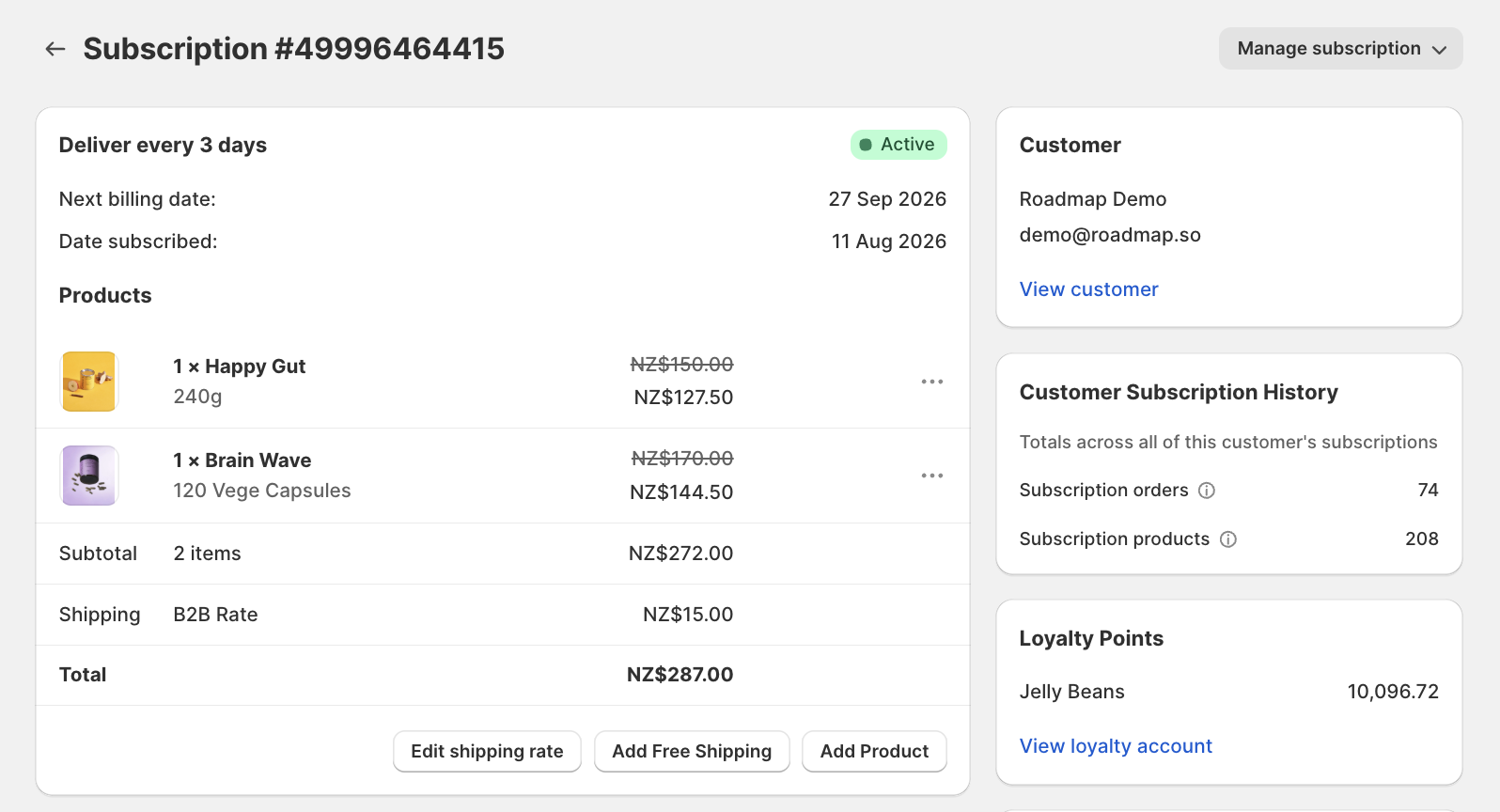
Open the contract from **Subscriptions**. The first card carries the subscription itself:
* The cadence and status at the top, for example `Deliver every 3 days` with an **Active** pill
* **Next billing date** and **Date subscribed**
* **Products**, the line items the contract bills for
* **Subtotal**, **Shipping** and **Total**
Each product line shows its original price struck through with the subscription price beneath it, so you can see what the customer is actually charged after their plan discount.
Three buttons sit under the totals: **Edit shipping rate**, **Add Free Shipping** and **Add Product**.
### Add a product
Click **Add Product** under the totals.
The picker offers the products available on the plan that matches the contract's current products, so you cannot add something the customer's plan does not support.
The product joins the contract and ships on every future order at the contract's usual cadence.
### Edit or remove a product
Each product line has a `•••` menu holding **Edit** and **Remove**.
**Edit** opens **Edit subscription product**, which states at the top: *This will update the product for ALL future orders in this subscription.* You can change:
* **Select Product / Variant**
* **Quantity**
Click **Update subscription** to apply it. Changing the variant here is how you make a permanent swap for the customer.
**Remove** takes the product off the contract entirely.
Both apply from the next order onward. Orders already created are not rewritten.
{% hint style="warning" %}
A subscription has to keep at least one product. Removing the last one is not the way to end a subscription: pause or cancel it instead. See [Pausing, canceling, and reactivating subscriptions](/subscriptions/managing-subscriptions/pausing-canceling-and-reactivating-subscriptions.md).
{% endhint %}
### Make sure you are on the contract, not an order
The **Orders** list further down the page has its own `•••` menus with **Edit** and **Remove**. They look identical to the ones on the Products card, but they change a single delivery rather than the contract.
The modal heading and banner tell you which one you opened:
| Modal | Banner | Changes |
| ------------------------------- | ----------------------------------------------------------------------------------------------------------- | ------------ |
| **Edit subscription product** | *This will update the product for ALL future orders in this subscription.* | The contract |
| **Edit upcoming order product** | *This will update the product ONLY for this upcoming order. The subscription itself will remain unchanged.* | One delivery |
If you find yourself in **Edit upcoming order product** and you meant to change the subscription, cancel and use the Products card instead. For everything scoped to a single delivery, see [Adjusting an upcoming subscription order](/subscriptions/managing-subscriptions/adjusting-an-upcoming-subscription-order.md).
### What the customer can do
Customers can add and remove subscription products themselves from their account dashboard, and swap between the products on their plan. If a contract has changed and you did not do it, the contract's **Timeline** records who made each change.
See [The customer subscription dashboard: a tour](/subscriptions/storefront-and-accounts/the-customer-subscription-dashboard-a-tour.md) and [The Subscription Activity Timeline](/subscriptions/managing-subscriptions/the-subscription-activity-timeline.md).
### Related guides
* [Adjusting an upcoming subscription order](/subscriptions/managing-subscriptions/adjusting-an-upcoming-subscription-order.md): changing a single delivery instead of the contract
* [Changing shipping on a subscription contract](/subscriptions/managing-subscriptions/changing-shipping-on-a-subscription-contract.md)
* [Rewarding a subscriber with free shipping](/subscriptions/managing-subscriptions/rewarding-a-subscriber-with-free-shipping.md)
* [The customer subscription dashboard: a tour](/subscriptions/storefront-and-accounts/the-customer-subscription-dashboard-a-tour.md)
* [The Subscription Activity Timeline](/subscriptions/managing-subscriptions/the-subscription-activity-timeline.md)
---
# Agent Instructions
This documentation is published with GitBook. GitBook is the documentation platform designed so that both humans and AI agents can read, navigate, and reason over technical content effectively. Learn more at gitbook.com.
## Querying This Documentation
If you need additional information that is not directly available in this page, you can query the documentation by asking a question.
Perform an HTTP GET request on the following URL with the `ask` and `goal` query parameters:
```
GET https://docs.roadmap.so/subscriptions/managing-subscriptions/changing-the-products-on-a-subscription-contract.md?ask=&goal=
```
`ask` is the immediate question: it should be specific, self-contained, and written in natural language.
`goal` is what the user is ultimately trying to achieve, the reason they need the answer. Sharing it helps GitBook give you a better, more relevant answer. A goal is most helpful when it describes the outcome the user wants rather than restating the question. For example, with `ask=how do I create an API token`, a goal like `automate deployments from our CI pipeline` lets GitBook tailor the answer to that use case.
The response will contain a direct answer to the question and relevant excerpts and sources from the documentation.
Use this mechanism when the answer is not explicitly present in the current page, you need clarification or additional context, or you want to retrieve related documentation sections.