> For the complete documentation index, see [llms.txt](https://docs.roadmap.so/llms.txt). Markdown versions of documentation pages are available by appending `.md` to page URLs; this page is available as [Markdown](https://docs.roadmap.so/reviews/managing-reviews/shared-reviews/shared-reviews-across-products.md).
# Shared reviews across products
Use this guide when you want multiple products in the **same store** to share one review pool.
If you also need to connect stores or map products between stores, use [Shared Reviews](/reviews/managing-reviews/shared-reviews.md).
**Shared Reviews** lets you reuse the same pool of reviews across products that are effectively the same item. This helps new or lower-traffic products display meaningful review content sooner.
{% stepper %}
{% step %}
#### Open Reviews settings
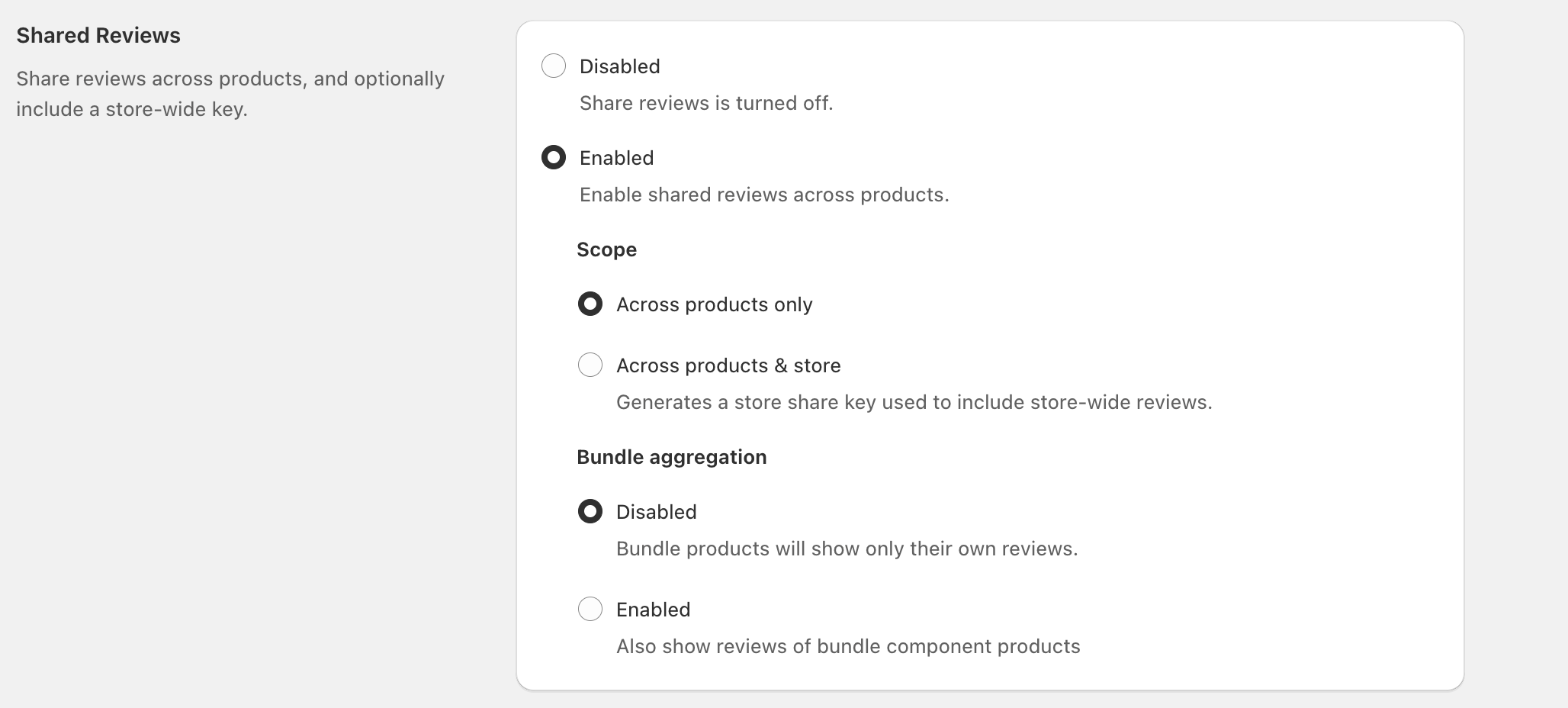
In your Reviews settings, open **Shared Reviews**.
{% endstep %}
{% step %}
#### Enable Shared Reviews
Under **Shared Reviews**, select **Enabled**.
{% endstep %}
{% step %}
#### Choose **Across products only**
Under **Scope**, select **Across products only**.
Use this option when you want review sharing between grouped products in one store.
{% endstep %}
{% step %}
#### Optional: enable bundle aggregation
Under **Bundle aggregation**, choose whether bundles should also show reviews from their component products.
{% endstep %}
{% step %}
#### Create a review group
Go to **Reviews → Shared Reviews** and click **Create Group**.
Enter a **Name**, then add the products that should share reviews.
Click **Save** to start using one shared review pool across that group.
{% endstep %}
{% endstepper %}
### Across products only
Select **Across products only** to share reviews among products you’ve grouped together—without pulling in any store-wide review pool.
This is the right option for refills, separate product listings for different sizes, or similar SKUs that should show the same reviews.
### If you also need store sharing
Use **Across products & store** if you want review sharing across connected stores as well.
That setup adds a **Store share key** and product mapping between stores. For that flow, use [Shared Reviews](/reviews/managing-reviews/shared-reviews.md).
### Bundle aggregation (bundles vs component products)
**Bundle aggregation** controls what reviews appear on bundle products.
* **Disabled**: “Bundle products will show only their own reviews.”
* **Enabled**: “Also show reviews of bundle component products.”
If you sell bundles that are primarily a combination of existing products (rather than a truly unique product), enabling **Bundle aggregation** can make the bundle page feel more trustworthy faster.
### Common use cases
* **Refills:** Share reviews between a starter product and its refill SKU(s).
* **Variants split into separate products:** Share reviews across sizes, colors, or packs when each is a separate product listing.
* **Model refreshes:** Carry review momentum from an older model to a new model when the experience is materially similar.
Only share reviews across products that are genuinely comparable. Sharing reviews across meaningfully different products can confuse shoppers and reduce trust.
### Troubleshooting duplicate reviews
#### A review appears in multiple review groups
A review can appear in more than one review group. This is expected when its product belongs to multiple groups.
The review is not duplicated. It displays in every group associated with its product.
To prevent this, ensure each product belongs only to the review group where you want its reviews shown.
#### The same review appears twice across stores
Reviews can appear twice when the same review exists in each connected store.
This can happen when you submit or import the same review separately into every store. Shared Reviews syncs these records, so both copies display in the storefront.
Keep the original review in its store of origin. Remove each duplicate from the other stores.
### FAQ
Will Shared Reviews change the original review text or rating?
No—Shared Reviews changes where reviews can be displayed. Individual review content stays the same; the setting controls which products can surface that content.
When should I use “Across products & store”?
Use it when many products should draw from a broader, store-wide pool (for example, a product line where items are highly similar). If you only want sharing within a tightly defined set of products, use **Across products only**.
Do I need Bundle aggregation?
Only if you sell bundles and want bundle pages to display reviews from the bundle’s component products. If bundles are unique (and should be reviewed on their own), leave **Bundle aggregation** set to **Disabled**.
---
# Agent Instructions
This documentation is published with GitBook. GitBook is the documentation platform designed so that both humans and AI agents can read, navigate, and reason over technical content effectively. Learn more at gitbook.com.
## Querying This Documentation
If you need additional information that is not directly available in this page, you can query the documentation by asking a question.
Perform an HTTP GET request on the following URL with the `ask` and `goal` query parameters:
```
GET https://docs.roadmap.so/reviews/managing-reviews/shared-reviews/shared-reviews-across-products.md?ask=&goal=
```
`ask` is the immediate question: it should be specific, self-contained, and written in natural language.
`goal` is what the user is ultimately trying to achieve, the reason they need the answer. Sharing it helps GitBook give you a better, more relevant answer. A goal is most helpful when it describes the outcome the user wants rather than restating the question. For example, with `ask=how do I create an API token`, a goal like `automate deployments from our CI pipeline` lets GitBook tailor the answer to that use case.
The response will contain a direct answer to the question and relevant excerpts and sources from the documentation.
Use this mechanism when the answer is not explicitly present in the current page, you need clarification or additional context, or you want to retrieve related documentation sections.