> For the complete documentation index, see [llms.txt](https://docs.roadmap.so/llms.txt). Markdown versions of documentation pages are available by appending `.md` to page URLs; this page is available as [Markdown](https://docs.roadmap.so/loyalty-and-rewards/troubleshooting/referral-rewards-not-applying.md).
# Referral rewards not applying?
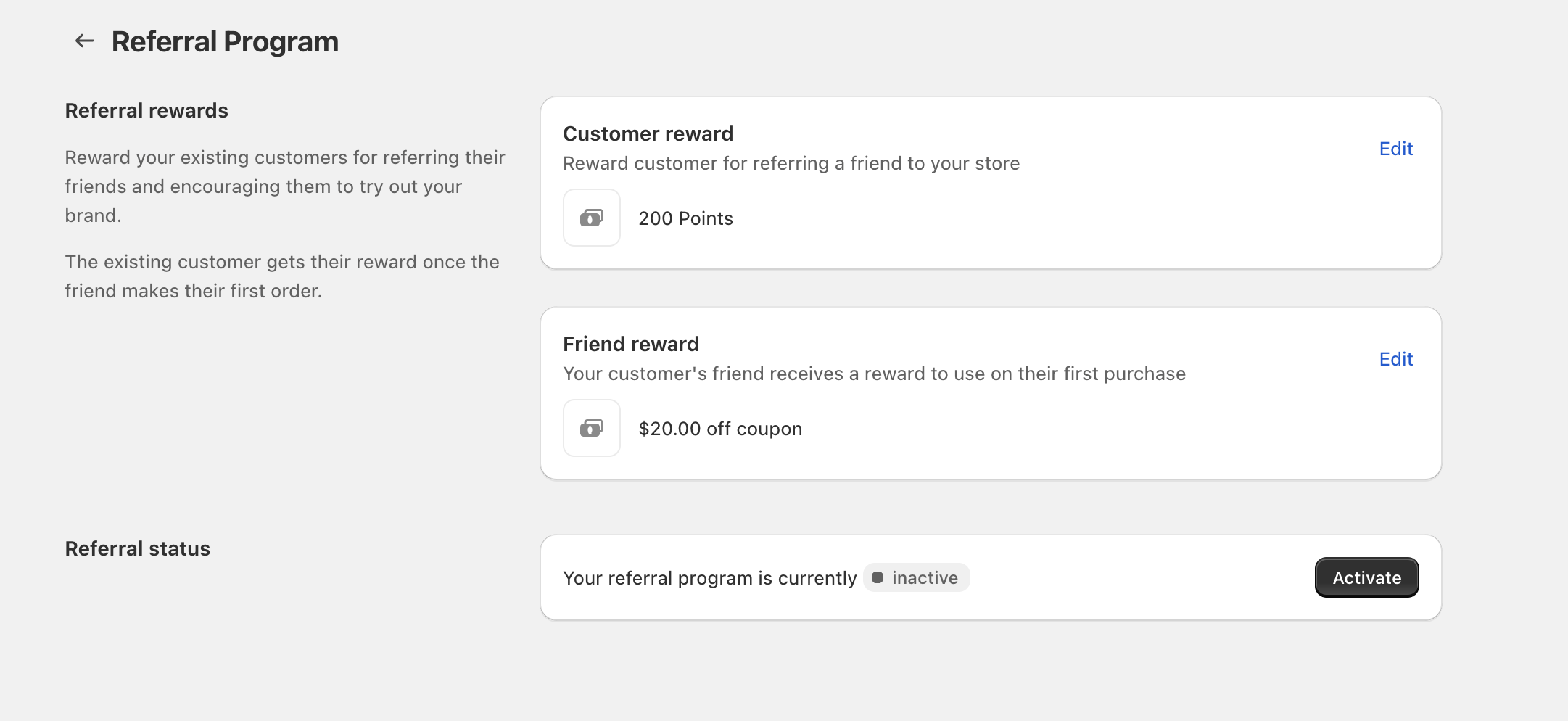
If referral rewards aren’t applying the way you expect (no points awarded, or a referral coupon won’t work), the cause is usually one of these: the **Referral Program** is inactive, the reward is set to **No reward**, the **friend hasn’t placed their first order** yet, or the discount reward has restrictions that the order doesn’t meet.
The referring customer receives their reward **once the friend makes their first order**. The **Friend reward** is intended to be used on the friend’s **first purchase**.
### Quick checklist
* Confirm the program is active\
Open **Referral Program** and look at **Referral status**. If it shows **inactive**, click **Activate**.
* Verify reward types (not “No reward”)\
In **Referral Program**, check both **Customer reward** and **Friend reward**. Click **Edit** and confirm the correct option is selected: **Points** or **Discount** (not **No reward**).
* Make sure the trigger happened\
Confirm the referred friend completed their **first order**. The referring customer’s reward is only granted after that first order is placed.
* If using a Discount reward, check restrictions\
In the reward’s **Edit** panel, verify restrictions like **Applies to**, **Purchase Type**, and **Minimum spend** match the test order.
* Rule out conflicts with other promos\
Temporarily pause other active promotions (for example in **Discounts / Gift with Purchase**) and retest. Overlapping offers can cause unexpected results.
### Step-by-step troubleshooting
{% stepper %}
{% step %}
#### Referral status is inactive
If the program is inactive, no referral rewards will be generated or granted.
* Go to **Referral Program**.
* Find **Referral status**.
* If it shows **inactive**, click **Activate**.
{% endstep %}
{% step %}
#### The reward is set to “No reward”
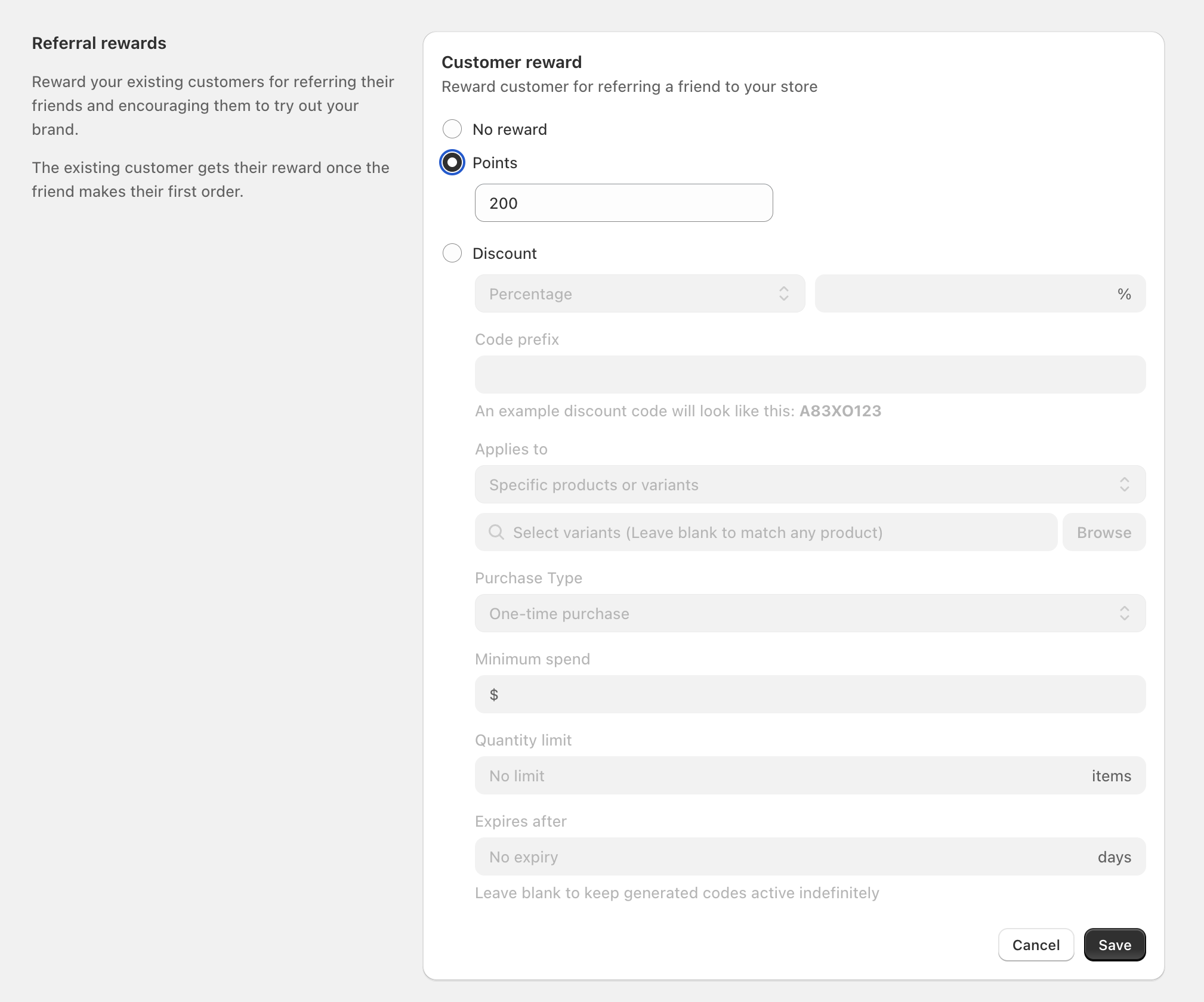
Either side of the referral can be turned off. If a customer expects a reward but that reward is set to **No reward**, nothing will apply.
* From **Referral Program**, click **Edit** next to **Customer reward**.
* Confirm **Points** or **Discount** is selected (or intentionally keep **No reward**).
* Repeat for **Friend reward**.
{% endstep %}
{% step %}
#### The friend hasn’t placed a first order yet
This is the most common reason the referring customer doesn’t see points (or a reward) show up.
* The referring customer’s reward is granted **after** the referred friend makes their **first order**.
* If you’re testing, ensure the friend completes checkout (not just adds items to cart).
When testing, use a real customer account and complete a real first-order flow for the friend. Tests that stop before checkout completion won’t trigger the advocate reward.
{% endstep %}
{% step %}
#### Discount reward restrictions don’t match the cart
If your referral reward is a **Discount**, it behaves like a coupon-style discount with rules. If any rule doesn’t match, the code may not apply.
In **Referral Program**, click **Edit** on the reward and review:
* **Applies to** (for example, **Specific products or variants**)
* **Select variants** (if set, the cart must include those variants; you can use **Browse** to choose them)
* **Purchase Type** (for example, **One-time purchase** or **Both**)
* **Minimum spend**
* **Quantity limit**
* **Expires after** (if not **No expiry**, the code can become invalid after the set number of days)
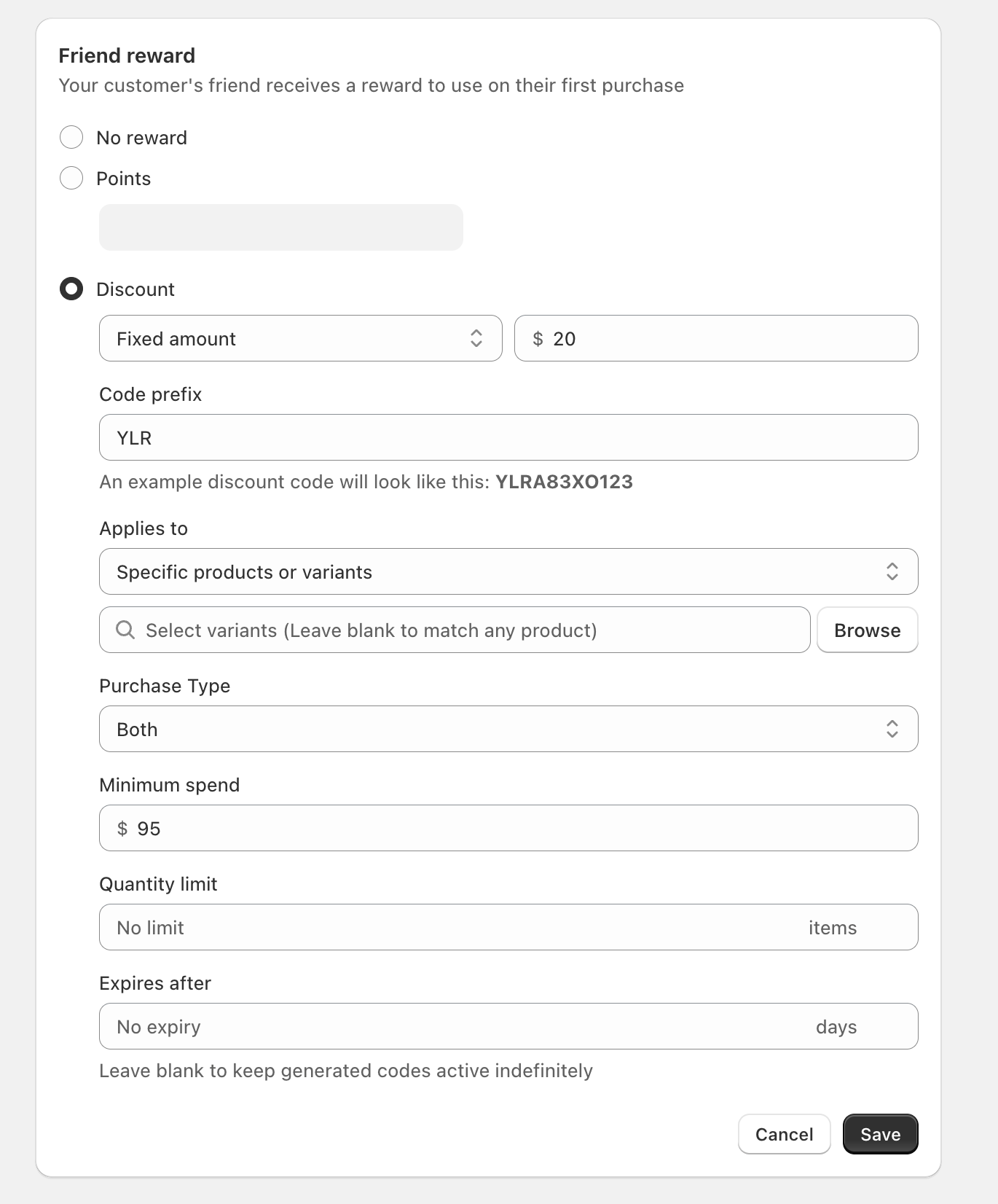
If **Applies to** is set to **Specific products or variants**, the discount will only work when the cart includes those items. A common testing mistake is using a different product (or a different variant).
{% endstep %}
{% step %}
#### Another promotion or coupon is taking precedence
If you run multiple offers at once (or the customer uses another coupon), it can change what applies at checkout.
* If you’re also running offers in **Discounts / Gift with Purchase**, temporarily pause them and retest the referral reward.
* If the customer redeemed points (loyalty coupons) from **Redeem points → Ways to redeem**, those coupons may conflict with other discounts.
If you’re unsure whether you’re testing a referral coupon vs. a loyalty coupon, double-check where it was configured: referral coupons come from **Referral Program** when the reward type is **Discount**.
{% endstep %}
{% endstepper %}
### FAQ
The friend reward coupon won’t apply—what should I check first?
* In **Referral Program**, click **Edit** on **Friend reward** and confirm it’s set to **Discount** (not **No reward**).
* Check **Minimum spend**, **Applies to**, and **Purchase Type** restrictions.
* Confirm the friend is using the reward on their **first purchase**.
The advocate didn’t get points—does it happen immediately?
No. The referring customer receives their reward **once the friend makes their first order**.
What does “Code prefix” do?
**Code prefix** sets the starting characters for generated referral discount codes. The example displayed under the field updates to show a preview of the code format.
---
# Agent Instructions
This documentation is published with GitBook. GitBook is the documentation platform designed so that both humans and AI agents can read, navigate, and reason over technical content effectively. Learn more at gitbook.com.
## Querying This Documentation
If you need additional information that is not directly available in this page, you can query the documentation dynamically by asking a question.
Perform an HTTP GET request on the current page URL with the `ask` query parameter, and the optional `goal` query parameter:
```
GET https://docs.roadmap.so/loyalty-and-rewards/troubleshooting/referral-rewards-not-applying.md?ask=&goal=
```
`ask` is the immediate question: it should be specific, self-contained, and written in natural language.
`goal` is optional and describes the broader end goal you are ultimately trying to accomplish on behalf of the user. GitBook uses it to tailor the answer towards what is most useful for that goal.
The response will contain a direct answer to the question and relevant excerpts and sources from the documentation.
Use this mechanism when the answer is not explicitly present in the current page, you need clarification or additional context, or you want to retrieve related documentation sections.