> For the complete documentation index, see [llms.txt](https://docs.roadmap.so/llms.txt). Markdown versions of documentation pages are available by appending `.md` to page URLs; this page is available as [Markdown](https://docs.roadmap.so/loyalty-and-rewards/points-and-ways-to-earn/how-to-stop-customers-earning-points-on-discounted-or-sale-items.md).
# How to Stop Customers Earning Points on Discounted or Sale Items
### Where this is configured
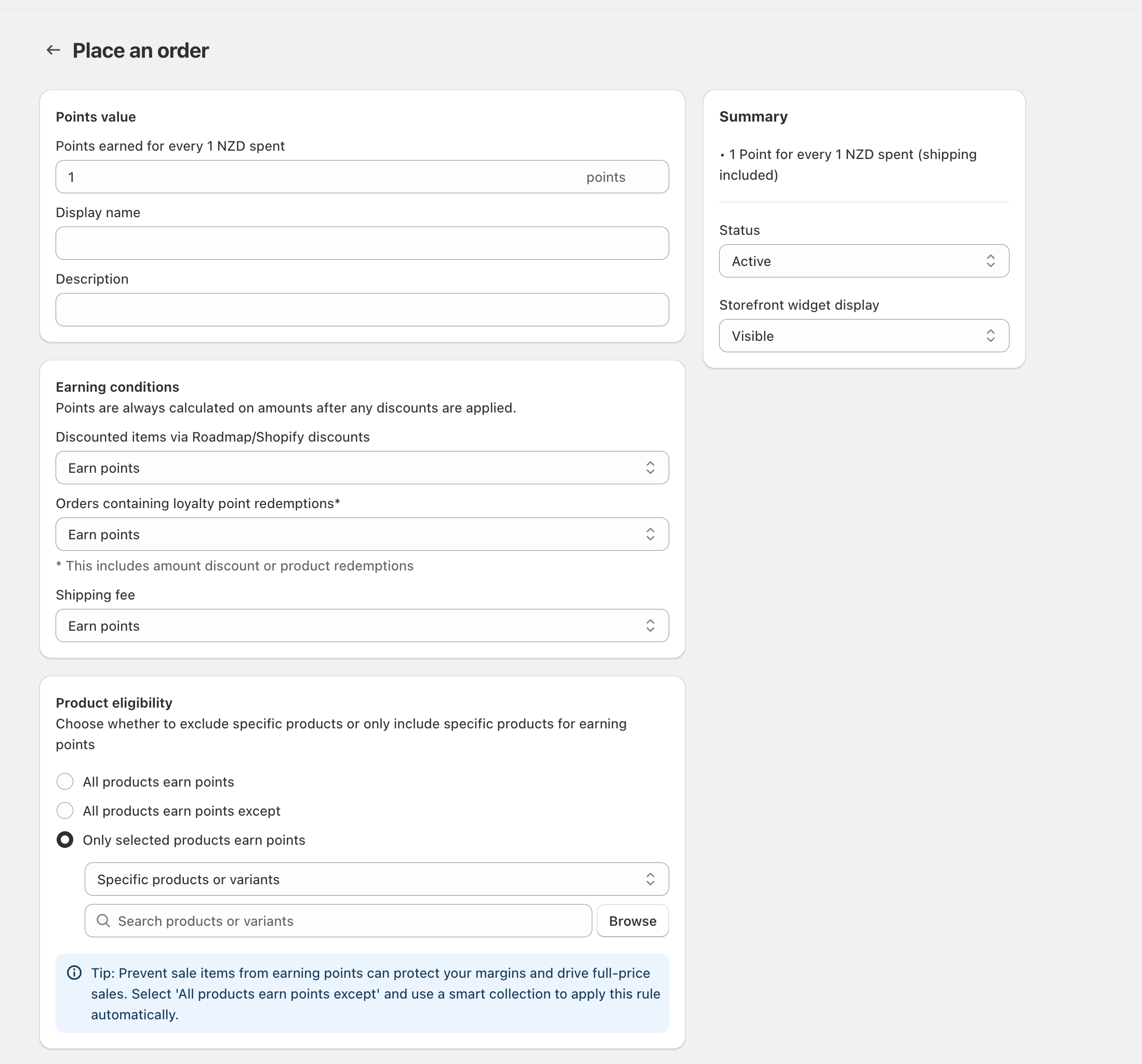
Sale-item exclusions are controlled inside your **“Place an order”** points-earning rule. This is where you set:
* How many points customers earn (**Points value**)
* Whether discounted items should earn points (**Earning conditions**)
* Which products are eligible to earn points (**Product eligibility**)
{% stepper %}
{% step %}
### Option 1: Exclude discounted items (automatic)
If your “sale items” are created using Shopify discounts (or Roadmap discounts), you can stop points from being earned on discounted line items.
* Open the Place an order rule\
Go to the **Place an order** rule where you see **Points value**, **Earning conditions**, and **Product eligibility**.
* Update Discounted items setting\
In **Earning conditions**, find **Discounted items via Roadmap/Shopify discounts** and change it from **Earn points** to the option that prevents earning on discounted items (for example, **Don’t earn points**).
* Save and test\
Save your changes, then run a quick test order with a discounted item to confirm no points are awarded for that line item.
Notes:
* **Points are calculated after discounts.** The rule notes: “Points are always calculated on amounts after any discounts are applied.” This means even if you still allow discounted items to earn points, the points will be based on the discounted price (not the original price).
{% endstep %}
{% step %}
### Option 2: Exclude “sale items” by product list (recommended for sale collections)
If your sale items are managed as a group (for example, a “Sale” smart collection), exclude those products using **Product eligibility**.
* Switch Product eligibility to an exclusion list\
In **Product eligibility**, select **All products earn points except**.
* Choose what you’re excluding\
Use the selector to choose the set you want to exclude (for example, a smart collection of sale items). If you’re excluding individual items instead, choose **Specific products or variants**.
* Add the sale items\
Use **Search products or variants** (or click **Browse**) to add the products/variants you want to exclude from earning points.
Recommendation:
* If you frequently rotate sale items, exclude them using **All products earn points except** and a **smart collection**. That way, anything that enters/leaves the Sale collection is automatically excluded/included without manual updates.
{% endstep %}
{% endstepper %}
### Common related settings (optional)
* Should shipping earn points?\
In **Earning conditions**, use **Shipping fee** to control whether points apply to shipping charges. Set it to the option that matches your policy.
* What about orders that use points redemptions?\
Use **Orders containing loyalty point redemptions\*** to decide whether customers still earn points on orders where they redeemed points (including amount discounts or product redemptions).
* Interaction note:\
If you exclude products via **Product eligibility**, those items won’t earn points even at full price. If you only want to block points when an item is discounted, use **Discounted items via Roadmap/Shopify discounts** instead (Option 1).
Related articles:
* [Can I limit earning to certain products, collections, or customer groups?](/loyalty-and-rewards/points-and-ways-to-earn/limit-points-earning-by-product-variant-or-collection.md)
* [Why aren’t customers earning points?](/loyalty-and-rewards/troubleshooting/customers-not-earning-loyalty-points.md)
* [How do I set rules for tier progression?](/loyalty-and-rewards/membership-tiers-and-referrals/tier-progression-rules.md)
---
# Agent Instructions
This documentation is published with GitBook. GitBook is the documentation platform designed so that both humans and AI agents can read, navigate, and reason over technical content effectively. Learn more at gitbook.com.
## Querying This Documentation
If you need additional information that is not directly available in this page, you can query the documentation dynamically by asking a question.
Perform an HTTP GET request on the current page URL with the `ask` query parameter, and the optional `goal` query parameter:
```
GET https://docs.roadmap.so/loyalty-and-rewards/points-and-ways-to-earn/how-to-stop-customers-earning-points-on-discounted-or-sale-items.md?ask=&goal=
```
`ask` is the immediate question: it should be specific, self-contained, and written in natural language.
`goal` is optional and describes the broader end goal you are ultimately trying to accomplish on behalf of the user. GitBook uses it to tailor the answer towards what is most useful for that goal.
The response will contain a direct answer to the question and relevant excerpts and sources from the documentation.
Use this mechanism when the answer is not explicitly present in the current page, you need clarification or additional context, or you want to retrieve related documentation sections.