> For the complete documentation index, see [llms.txt](https://docs.roadmap.so/llms.txt). Markdown versions of documentation pages are available by appending `.md` to page URLs; this page is available as [Markdown](https://docs.roadmap.so/loyalty-and-rewards/getting-started/loyalty-membership-eligibility-settings.md).
# Loyalty membership eligibility settings
Control who participates in your loyalty program and how long membership tiers last — all customers versus store accounts only, and lifetime versus fixed-duration membership.
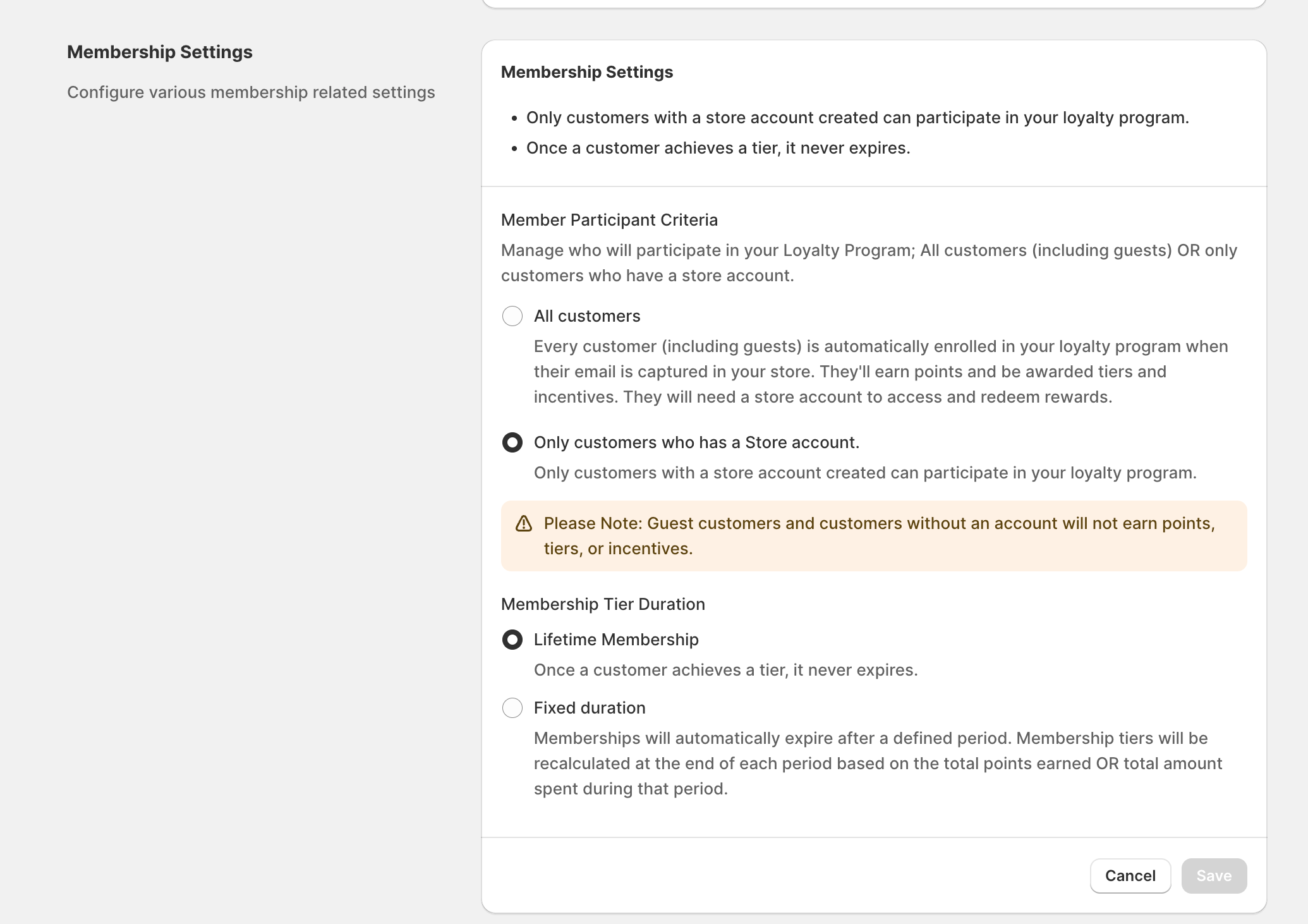
In Roadmap Loyalty, **membership eligibility** controls which customers are considered “participants” in your loyalty program—meaning who can **earn points**, **progress through tiers**, and **redeem rewards**.
You configure this in **Membership Settings** under **Member Participant Criteria**. There are two options:
* **All customers**
* **Only customers who have a store account**
Membership Settings — here set to All customers with Lifetime Membership.
### Where to change this setting
{% stepper %}
{% step %}
#### Open Membership Settings
In the Roadmap admin, go to **Membership Settings**.
{% endstep %}
{% step %}
#### Choose Member Participant Criteria
Under **Member Participant Criteria**, select **All customers** or **Only customers who have a store account**.
{% endstep %}
{% step %}
#### Save
Click **Save** (or **Cancel** to discard changes).
Once your Loyalty program is set to **Active**, this setting can’t be changed unless you deactivate your program first.
Changing eligibility affects who can earn and redeem **moving forward**. For example, if you switch to **Only customers who have a store account**, guest customers (and any customer without a store account) will stop earning points and won’t be able to redeem until they have a store account.
{% endstep %}
{% endstepper %}
***
### Option 1: All customers
When **All customers** is selected:
* Any customer becomes a loyalty member once their **email is captured** (online or in POS).
* They can **earn points** and be awarded **tiers** and **incentives**.
* They can redeem rewards in POS with a store account. However, to redeem online, they will need to **log in to a store account** to access their rewards attributed to the email address.
### Who may be limited?
* **Customers without a store account** can still earn, but may not be able to fully redeem online until they create an account and log in.
* **Customers without an email address** (for example, created in POS without an email) can’t enter the loyalty program until an email is added to their customer profile.
### Customer journey (All customers)
{% stepper %}
{% step %}
Email captured (online or in POS) → customer is enrolled as a loyalty member.
{% endstep %}
{% step %}
Customer begins to **earn loyalty points**.
{% endstep %}
{% step %}
Roadmap records membership details (for example, **member since**, **start date**, and **tier status**).
{% endstep %}
{% step %}
Customer can **redeem** in POS; for online redemption they may need to **log in**.
{% endstep %}
{% endstepper %}
***
### Option 2: Only customers who have a store account
When **Only customers who have a store account** is selected:
* Only customers who meet Roadmap’s definition of **“has a store account”** can participate.
* Customers who do **not** have a store account won’t earn points, tiers, or incentives until they do.
This setting is best if you want loyalty to be tied to logged-in customer accounts (for example, to support a consistent online redemption experience).
{% hint style="warning" %}
Guests and customers without accounts do not earn points, tiers, or incentives. Creating an account later does not award points for earlier orders.
{% endhint %}
### What “has a store account” means (membership triggers)
When eligibility is set to **Only customers who have a store account**, Roadmap uses specific customer actions as “triggers” that qualify a customer as a member.
#### Legacy Account Stores: Triggers that make a customer eligible (or not)
| Customer action | Counts as a member today? | Notes / how it’s detected |
| ----------------------------------------------------------- | ------------------------- | -------------------------------------------------------------------------------------------------------------------------------------------------- |
| Customer logs in online (email + password) | **Yes** | Detected when the customer account is enabled in Shopify (Roadmap receives the enabled status). |
| POS order placed with a customer profile with email address | **Yes** | POS order linked to a customer will qualify them as a member for loyalty participation (as long as the customer profile has an **email address**). |
| Admin creates a customer profile (no purchase) | **No** | Creating a customer record alone doesn’t qualify them for loyalty when “store account” eligibility is required. |
| POS customer created without an order | **No** | A customer profile created in POS (without an order) does not qualify as having a store account. |
| Guest checkout online | **No** | Guest checkout does not create/confirm a store account. |
| Shop Pay checkout | **No** | Shop Pay checkout alone does not qualify as having a store account for this setting. |
| Newsletter signup | **No** | Marketing opt-in does not qualify as a store account. |
| Third-party app creates a customer | **No** | Customer creation via an app does not qualify as a store account by itself. |
When “Only customers who have a store account” is enabled, customers must also have an **email address** on their customer profile to participate. If a POS customer has no email, they won’t be eligible until an email is added.
### Customer journey (Only customers who have a store account)
{% stepper %}
{% step %}
Customer creates an account and/or logs in online → customer becomes eligible.
{% endstep %}
{% step %}
Roadmap starts tracking them as a loyalty member (member since/start date/tier status).
{% endstep %}
{% step %}
From this date, customer earns points on eligible purchases and can redeem based on your rewards setup.
{% endstep %}
{% endstepper %}
***
Customers will not earn points prior to entering the loyalty program and will not be rewarded for past action that would result in earning points. To reward past actions, you will need to manually add these point into the customers loyalty account.
### Membership Tier Duration
**Membership Tier Duration** controls how long an earned tier lasts.
{% hint style="info" %}
These duration settings apply to **Points earned, Amount spent and Specific item purchased** tier types only. **Secondary loyalty program** (tag-based) tiers have no expiry date: see [Tag-based membership tiers](/loyalty-and-rewards/membership-tiers-and-referrals/tag-based-membership-tiers.md).
{% endhint %}
* **Lifetime Membership** means a tier never expires.
* **Fixed duration** expires after the period you set. Roadmap then recalculates tiers from points earned or amount spent during that period.
* **Reset expiry date on upgrade** restarts the membership period when the customer moves up a tier.
When a fixed-duration membership expires, Roadmap recalculates the customer's tier from that period's points or spend, resets their membership start date to the recalculation date, and logs the change on their timeline and Membership History. Klaviyo profile properties update at the same time.
Fixed duration also unlocks a rewarding pattern: customers who hold their tier through a recalculation can receive a tier-maintaining Customer Reward.
Store-account-only participation with a 12-month fixed membership duration.
### The Loyalty Pixel banner
Stores using Shopify's new customer accounts may see a banner. Click **Open customer accounts editor**, then add the **Loyalty Pixel** block.
The pixel lets Roadmap track customer logins. The banner disappears after Roadmap receives its first signal.
### Quick decision guide
* **Choose “All customers”** if you want loyalty to start as soon as you capture an email (including guest checkouts and POS emails).
* **Choose “Only customers who have a store account”** if you want loyalty participation limited to customers who have a verified store account/login experience.
If you sell both online and in-store and want POS shoppers to fully participate, make sure staff capture the customer’s **email** at checkout—especially when “Only customers who have a store account” is enabled.
### Related guides
* [Loyalty Tiers](/loyalty-and-rewards/membership-tiers-and-referrals/loyalty-tiers.md)
* [Tier progression rules](/loyalty-and-rewards/membership-tiers-and-referrals/tier-progression-rules.md)
* [Tag-based membership tiers](/loyalty-and-rewards/membership-tiers-and-referrals/tag-based-membership-tiers.md)
---
# Agent Instructions
This documentation is published with GitBook. GitBook is the documentation platform designed so that both humans and AI agents can read, navigate, and reason over technical content effectively. Learn more at gitbook.com.
## Querying This Documentation
If you need additional information that is not directly available in this page, you can query the documentation dynamically by asking a question.
Perform an HTTP GET request on the current page URL with the `ask` query parameter, and the optional `goal` query parameter:
```
GET https://docs.roadmap.so/loyalty-and-rewards/getting-started/loyalty-membership-eligibility-settings.md?ask=&goal=
```
`ask` is the immediate question: it should be specific, self-contained, and written in natural language.
`goal` is optional and describes the broader end goal you are ultimately trying to accomplish on behalf of the user. GitBook uses it to tailor the answer towards what is most useful for that goal.
The response will contain a direct answer to the question and relevant excerpts and sources from the documentation.
Use this mechanism when the answer is not explicitly present in the current page, you need clarification or additional context, or you want to retrieve related documentation sections.